
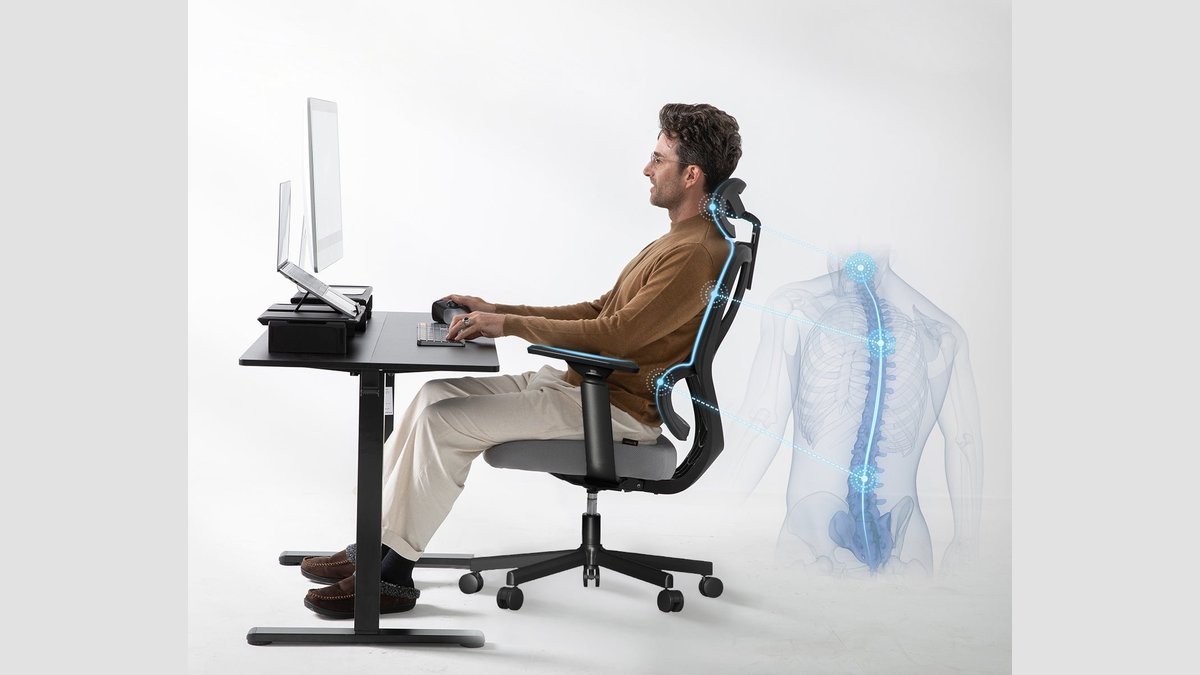
An ergonomic chair what is it—a piece of office furniture designed to support the natural curve of your spine and reduce physical strain during long hours of sitting. It features adjustable components that fit your specific body shape, preventing the discomfort that comes from using a standard, non-adjustable seat.
Key Parts of an Ergonomic Chair
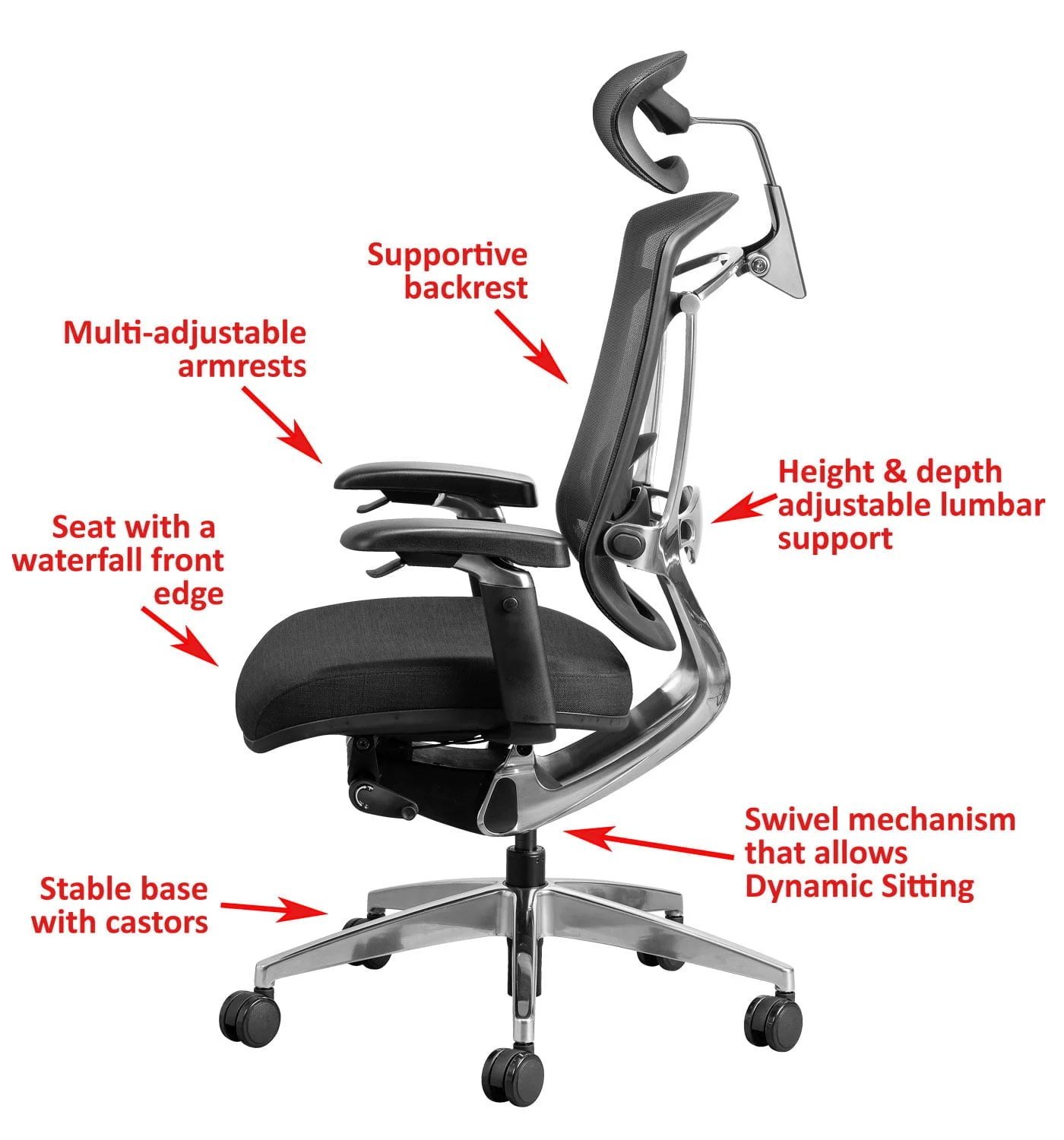
| Part or input | What it does | What you notice when it goes wrong |
|---|---|---|
| Lumbar support | Maintains spine curve | Lower back feels stiff or sore |
| Seat height | Aligns feet with floor | Thighs ache or feet dangle |
| Armrests | Relieves shoulder tension | Neck and shoulder muscles tighten |
| Seat depth | Supports full thigh length | Pressure behind the knees increases |
| Tilt tension | Controls recline resistance | Chair feels unstable or too stiff |
Adjusting Your Chair for Comfort
You must set your chair to match your body dimensions to gain any benefit. If you’re taller than six feet, you’ll need a chair with a higher gas lift cylinder; if you’re shorter than five feet, ensure the seat lowers enough so your feet touch the ground.
- Adjust the seat height until your feet rest flat on the floor and your knees are at a ninety-degree angle.
- Slide the seat depth so there’s a two-finger gap between the edge of the seat and your calf muscles.
- Position the lumbar support so it presses firmly into the inward curve of your lower back for maximum stability.
- Set the armrests so your elbows rest at a ninety-degree angle without forcing your shoulders to hunch upward.
- Tilt the backrest to a position that feels natural, usually between one hundred and one hundred and ten degrees.
- Test the tension by leaning back; the chair should support your weight without dropping suddenly or feeling frozen in place.
Why This Matters for Your Health
The primary goal of these design features is to minimize musculoskeletal disorders caused by poor posture. When you sit in a chair that doesn’t align with your body, your muscles work harder to keep you upright. This leads to fatigue, which often causes you to slouch. Slouching increases the pressure on the discs in your lumbar spine. According to the Occupational Safety and Health Administration’s computer workstation guide, maintaining a neutral body posture is essential to prevent injury. If your chair lacks proper depth, you might lean forward to reach your desk, which strains your neck. If the lumbar support is missing, your spine loses its natural “S” shape. These small, daily stresses accumulate over time, often resulting in chronic pain that could have been avoided with proper equipment adjustment.
What You Can Change and What You Cannot
Things You Control
- Seat height and tilt angle.
- Lumbar support position and depth.
- Armrest width and height settings.
- How often you stand to move.
Design Limits
- The maximum weight capacity of the frame.
- The total range of the height cylinder.
- The shape and size of the seat pan.
If you find that your pain persists even after adjusting these settings, stop using the chair and consult a physical therapist. They can assess if your discomfort is due to the equipment or an underlying physical issue that requires professional medical attention.
Getting More Out of It
You should treat your chair as a tool that requires regular checkups. Once a month, verify that all knobs and levers still lock securely into place. If you notice a lever slipping, don’t ignore it, as it can cause a sudden shift in your posture. Use a footrest if your desk height forces your chair to sit too high for your feet to touch the ground. Take a two-minute break to stand and stretch every sixty minutes of sitting. This resets your muscles and prevents the stiffness that even the best ergonomic chair can’t fully eliminate.
Frequently Asked Questions
Does an ergonomic chair fix back pain?
No, it doesn’t fix existing injuries. It provides the support necessary to maintain neutral posture while you sit, which helps reduce the strain that often leads to or worsens back discomfort.
How long should I sit in one?
You shouldn’t sit for more than sixty minutes without standing up. Even with the best support, your body needs movement to maintain circulation and prevent muscle fatigue in your legs and core.
Is it safe to buy a used one?
Yes, provided the mechanical parts still function correctly. Always check the labels for the original weight capacity and ensure the height adjustment mechanism works before you commit to using it daily.
Does the price reflect the quality?
Often, yes, but only because of the material quality and the number of adjustment points. Check the manufacturer’s documentation for the specific warranty and weight limits to see if the value fits your needs.
How do I know if it fits me?
You know it fits if your feet are flat, your back is supported, and your shoulders are relaxed. If you feel forced to lean in one direction to feel comfortable, the chair isn’t adjusted correctly.
Can I use it for gaming?
Yes, you can use it for gaming, but ensure the chair supports your spine during long sessions. Many office chairs offer better long-term ergonomic support than specialized gaming chairs, which often prioritize style over function.
Ergonomic chair, in short
Choosing the right chair is about finding the balance between your body size and the adjustments available. If you choose a model that doesn’t allow you to reach your desk comfortably, no amount of padding will save you from strain. Always prioritize a chair that feels like it was built for your specific height and weight.