
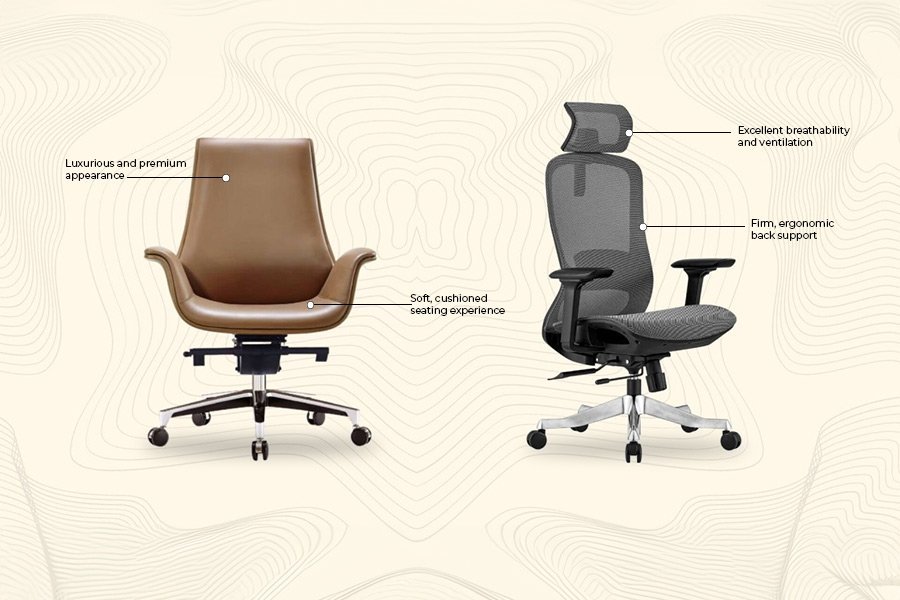
The best office chair for lower back problems features adjustable lumbar support and a seat depth that allows for a firm, upright posture. These chairs provide a stable base to maintain the natural curve of your spine, which helps reduce pressure on the lower back during long working hours.
Several factors change this answer, including your height, the amount of time you spend seated, and your current physical condition.
The Best Office Chair for Lower Back Problems
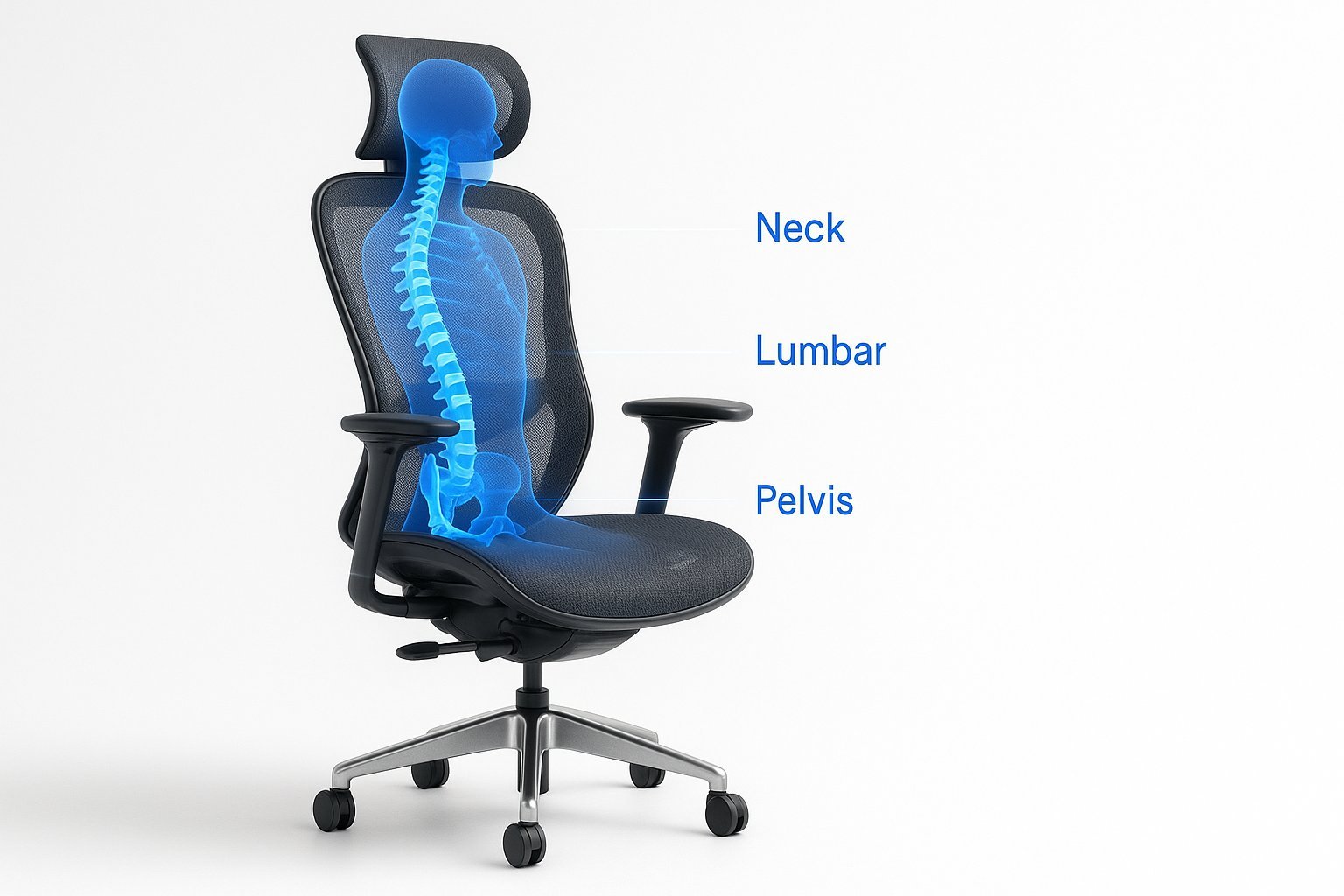
This chair is for people who spend four to six hours daily at a desk with lower back stiffness. It’s for the person who wants to replace a generic task chair with one designed for anatomical support. It isn’t for someone experiencing sharp, shooting pain or numbness, as those symptoms require a doctor’s evaluation rather than a new chair. Extremely tall or short users need a model with a wider gas-lift range.
Important features for support
The lumbar support is the most critical component, as it must align with the inward curve of your lower back. Look for models that allow you to move the support pad up or down by at least 3 inches.
Seat depth is the second most overlooked factor. You need about two to three inches of space between the edge of the seat and the back of your knees. If the seat is too deep, you’ll lean forward, losing the benefit of the backrest.
Adjustable armrests take shoulder weight off your back muscles. They should be set so your elbows rest at a 90-degree angle.
Step by step
- Place the chair on a flat, level surface and sit back as far as possible.
- Adjust the seat height so your feet are flat on the floor and your knees are level with your hips.
- Slide the seat depth until you have a two-finger gap between the seat edge and your calves.
- Move the lumbar support up or down until it rests firmly against the curve of your lower back.
- Set the tension of the recline so the chair supports your weight without pushing you forward.
- Position the armrests so your shoulders stay relaxed while your forearms rest comfortably.
- Use the tilt lock if your specific model has one to keep the backrest at your preferred angle.
- Check that your eyes are level with the top third of your monitor to keep your neck neutral.
The final judgment call is the “feel test.” If you feel a constant, gentle pressure against your lower back without any sharp points, you have found the right setting.
Comparison of chair types
| Situation | Best approach | Effort level | What to watch for |
|---|---|---|---|
| Long work days | High-end ergonomic chair | High | Seat cushion density |
| Occasional desk use | Mid-range mesh chair | Medium | Lumbar height adjustment |
| Shared workspace | Quick-adjust lever chair | Low | Ease of seat sliding |
| Small home office | Compact task chair | Medium | Footrest compatibility |
| Standing desk mix | Stool with backrest | High | Stability when sitting |
What separates a good result from a poor one
Proper body alignment
Effective support relies on the chair working with your anatomy, not against it. Sliding down the seat suggests the lumbar support is too low or the cushion is too slippery. Experienced users check their posture every two hours; if you feel yourself slouching, take a break to reset your position.
Maintaining the equipment
A good chair remains effective only if the mechanisms move freely. Beginners often ignore the tension knob, which controls how much force is needed to lean back. If the chair pushes you away, the tension is too high. You should be able to recline smoothly without your feet lifting off the floor. Keep the moving parts clean and check the bolts for tightness regularly to prevent the structure from wobbling.
What goes wrong, and what to do
| What you notice | What it usually means | What to do first | How to stop it happening again |
|---|---|---|---|
| Sliding forward | Seat is too deep | Add a back cushion | Adjust depth settings |
| Shoulder pain | Armrests too high | Lower the armrests | Check elbow angle |
| Thigh pressure | Seat too high | Lower the chair | Keep feet flat |
| Back stiffness | Lack of movement | Change your posture | Stand up hourly |
| Chair wobbles | Loose fasteners | Tighten all bolts | Check monthly |
Rules for workplace safety
The American National Standards Institute (ANSI) sets the BIFMA standards for office furniture performance, which include durability and stability requirements. Always consult a professional technician if the mechanical parts fail.
What it costs you
Cost depends on materials and adjustments. More adjustments increase the price. Durable materials cost more. Verify the return policy if you can’t test models in person. An ill-fitting chair costs more in discomfort and replacements.
Keeping it right afterwards
Keep your chair in top shape by cleaning the fabric or mesh according to the maker’s instructions. You should also check the wheels for hair and dust, as debris can stop them from rolling smoothly and cause you to jerk the chair, which strains your back.
When this is the wrong approach
This approach is the wrong choice if you have a diagnosed spinal condition or persistent pain. Relying on a standard office chair when your back requires medical intervention can delay your recovery and increase your risk of long-term injury.
Frequently asked questions
Is it safe to use a chair with a broken tilt lock?
No, a broken tilt lock can cause the chair to lean back unexpectedly, which creates a risk of falling. Stop using the chair until you have replaced the broken mechanism or the chair itself.
How long should I sit in a chair?
You should aim to change your position every 30 to 60 minutes. Even the most expensive chair can’t replace the need for movement, as sitting still for hours causes muscle fatigue.
Does a memory foam seat help back pain?
It can help by distributing your weight more evenly, but it doesn’t replace the need for proper lumbar support. Use a firm cushion if the chair base is too hard.
Why does my back hurt even with a good chair?
Your back pain may come from monitor height, desk height, or a lack of breaks. Ensure your screen is at eye level so you don’t have to hunch forward.
Can I add extra lumbar support?
Yes, you can add a separate lumbar pillow if your chair’s built-in support isn’t sufficient. Choose one that’s firm enough to maintain its shape while you lean against it.
Is an expensive chair worth the money?
It depends on how many hours you spend sitting. If you use the chair for full-time work, the durability and adjustability of a higher-priced model often justify the cost over time.
What to do next
Start by adjusting your current chair to see if you can achieve a neutral, upright posture using the steps provided. If you still feel pain after one full work week of proper alignment, consider testing different chairs in person. Stop immediately and seek professional advice if your pain increases.
Related guides