
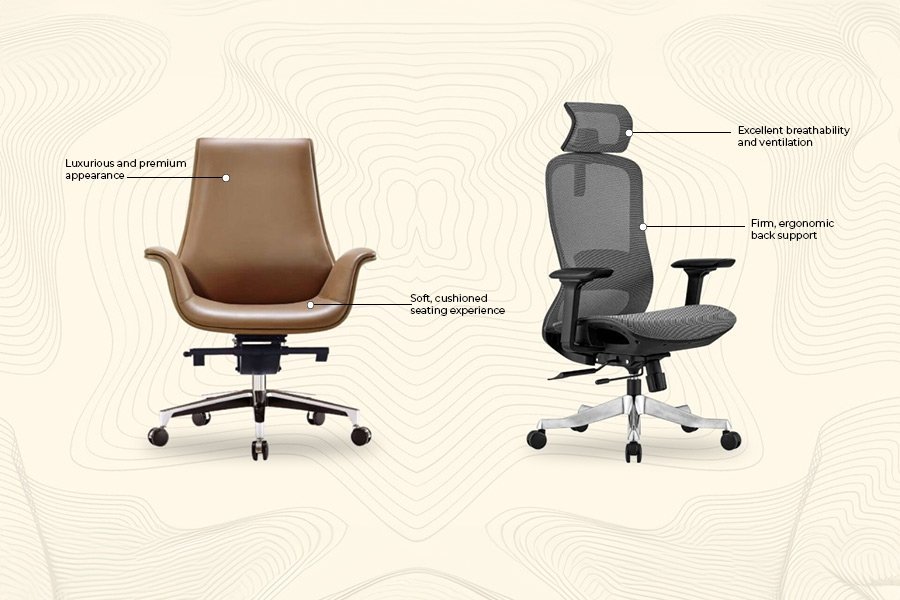
An ergonomic office chair with adjustable lumbar support is the best computer chair for back problems because it keeps your spine in a neutral position. For those with specific medical needs, a kneeling chair or a standing desk setup often provides better relief.
The Best Computer Chair for Back Problems
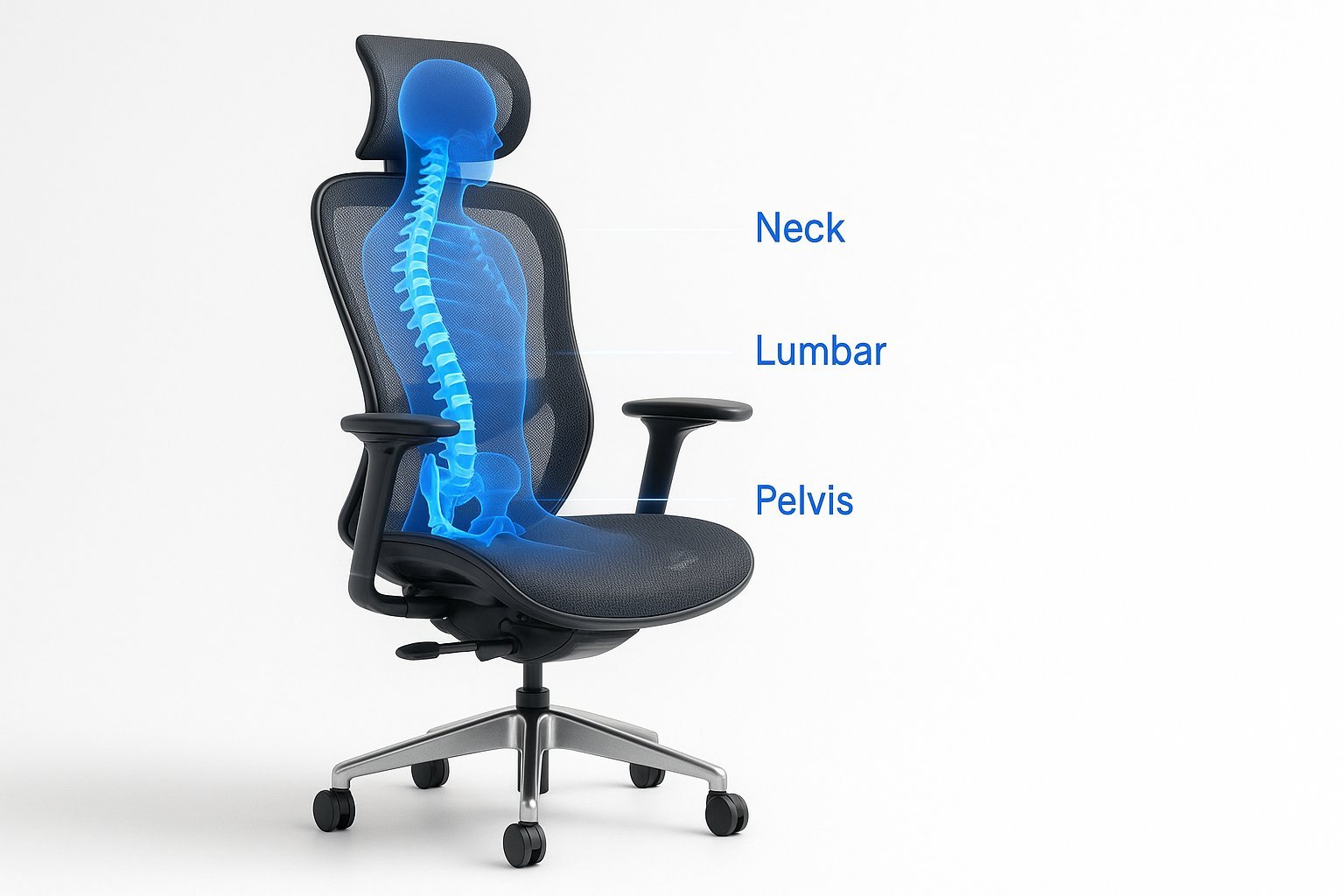
Choosing the right seating depends on your workspace setup and how long you sit during the day. Most people find that chairs with mechanical adjustments offer the most versatility for long sessions.
| Method | How long | Effort | Cost | Best for |
|---|---|---|---|---|
| Ergonomic Task Chair | All day | Low | Medium | Daily office work |
| Kneeling Chair | Short periods | Medium | Low | Active sitting |
| Standing Desk | Intermittent | High | High | Reducing stiffness |
If you spend over six hours at a desk, prioritize an ergonomic chair with adjustable lumbar support. A common mistake is choosing a chair based solely on aesthetics, which often leads to chronic lower back pain within months.
Use this decision rule: if you experience hip tightness, switch to a kneeling chair for two-hour blocks to open your pelvis. If you feel lethargic by mid-afternoon, transition to a standing desk for thirty minutes. You’re in the wrong setup if you shift your weight more than five times per hour.
Adjustable ergonomic task chairs
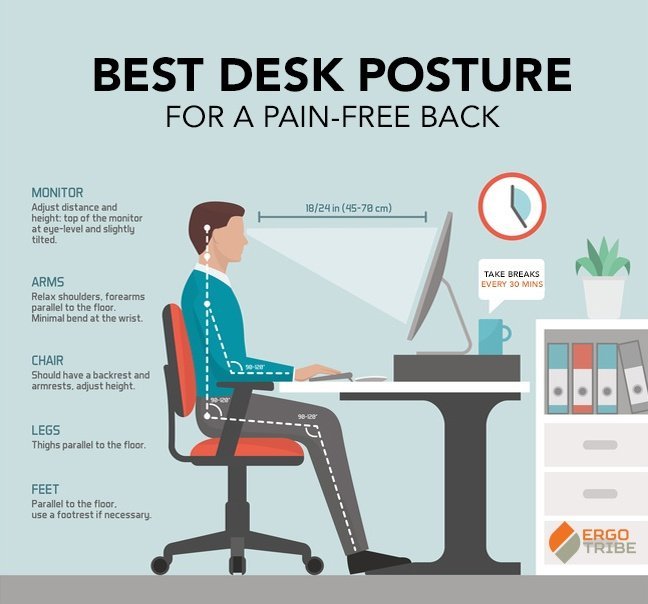
- Set your seat height so your feet rest flat on the floor with your knees at a ninety-degree angle.
- Adjust the lumbar support to fit the natural curve of your lower back.
- Tilt the backrest to a position between 100 and 110 degrees to reduce disc pressure.
- Move the armrests so your shoulders stay relaxed and your elbows stay close to your sides.
This style is excellent for long-term comfort and daily productivity. It allows for micro-movements throughout the day. However, these chairs are often bulky and take up significant floor space. If you have a small home office, ensure the footprint fits your area before buying.
Active kneeling chairs

- Place your shins on the padded rest while keeping your hips open at an obtuse angle.
- Adjust the seat slope to balance your weight between your seat and your knees.
- Shift your weight frequently to engage your core muscles and prevent muscle fatigue.
These chairs force a neutral spine alignment by tilting your pelvis forward. They’re great for people who feel slumping is their biggest issue. A major drawback is that they don’t support the upper back or head. This makes them unsuitable for long periods of work where you need to lean back or rest your neck.
Standing desk converters
Place your converter on a surface that allows your elbows to rest at a perfect ninety-degree angle. If your shoulders hunch while typing, the desk is too high; if you reach down, it’s too low. Adjust the keyboard tray until your forearms are parallel to the floor.
Position your monitor so the top third of the screen sits at eye level. This prevents the “tech neck” strain caused by looking down for hours. Use a stack of books or a dedicated riser if your converter lacks built-in height adjustment.
Switch between sitting and standing every 30 to 60 minutes. Set a recurring timer on your phone to avoid losing track of time.
This routine prevents static posture, but it isn’t for everyone. If you have chronic foot or leg fatigue, standing often worsens the pain. In these cases, prioritize a high-quality anti-fatigue mat to redistribute pressure across your soles.
Which one should you use?
If you’re in a hurry and need immediate support, choose an ergonomic task chair with a fixed lumbar cushion. It’s the easiest to set up and provides instant results. If you’re doing this for the first time, start with a task chair because it requires the least amount of physical adaptation.
If you want the best possible result regardless of effort, combine a high-quality ergonomic chair with a standing desk. This pairing gives you the flexibility to shift between sitting and standing, which is the most effective way to manage chronic lower back pain throughout the workday.
The decision rule is simple: if you work in a fixed position for more than four hours, prioritize the chair. If your tasks vary, prioritize the desk. Always check the manufacturer’s label for weight capacity and height limits. Buying a chair rated for 250 pounds when you weigh 280 will cause the gas cylinder to fail within months.
The rules that apply whichever way you choose
Regardless of the chair you pick, your posture matters most. Keep your screen at eye level to prevent “tech neck” and strain. Every hour, stand up and walk for two minutes to reset your muscles. If you feel sharp pain, consult a physical therapist. Ensure the seat depth supports your thighs without restricting circulation. Check the manual to confirm safety features are active. Moving forward, prioritize ergonomic adjustments to maintain long-term spinal health.