
Sitting for hours can make a good chair feel very important.
I used to think an ergonomic chair was just an office chair with more knobs. It is not that simple. An ergonomic chair is made to fit your body and support better sitting habits while you work.
The goal is simple. Your back, legs, arms, and neck should feel supported. The chair should also let you change your position instead of forcing you to sit in one fixed pose all day.
So, what is ergonomic chairs really about? It is about how a chair fits your body, your desk, and the work you do.
What Is an Ergonomic Chair?
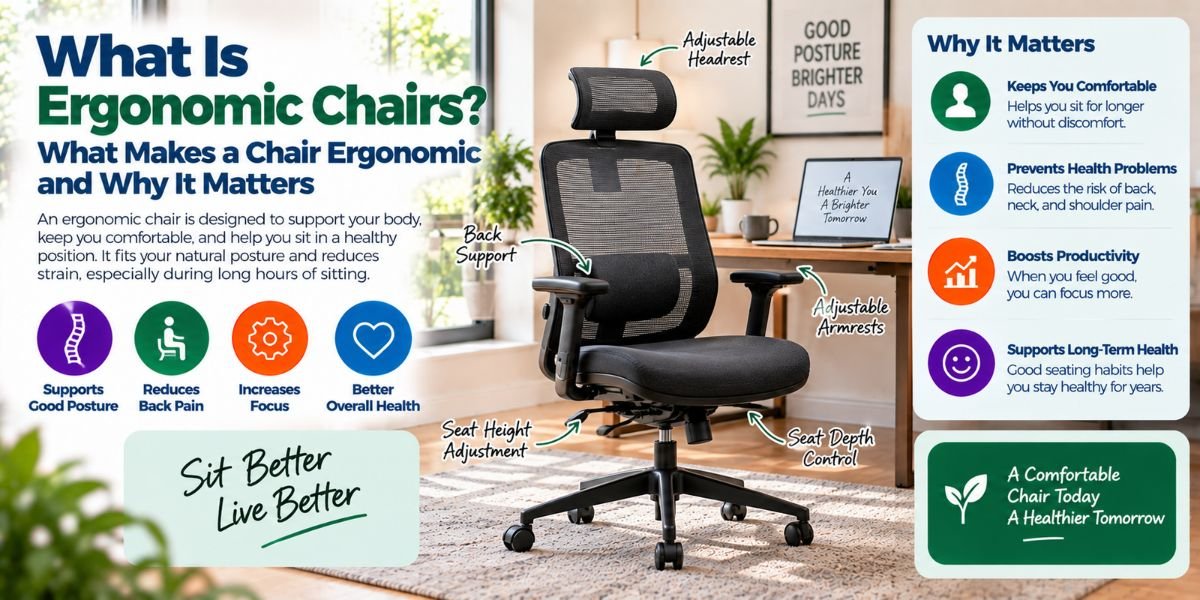
An ergonomic chair is a chair designed to support the body during sitting and help you maintain a more natural working position.
Unlike a basic chair, an ergonomic chair usually offers several adjustments. These may include seat height, seat depth, backrest position, lumbar support, armrest height, and recline tension.
The main idea is not to make you sit perfectly still.
A good ergonomic chair should help you stay supported while allowing small changes in posture. This matters because sitting in one position for a long time can still make you feel stiff and tired.
An ergonomic chair should work with you, not against you.
Why Are Ergonomic Chairs Different From Regular Office Chairs?
A regular office chair may look comfortable at first. It may have thick padding and a soft back.
But comfort alone does not make a chair ergonomic.
A chair can feel soft while giving poor support. It can also have a nice design but fit your body badly.
Ergonomic chairs focus more on fit and adjustment. The seat should give your legs enough support without pressing behind your knees. The backrest should support your back. The armrests should let your shoulders stay relaxed.
This is why two people can sit in the same chair and have very different experiences.
Your height, body shape, desk height, and work habits all matter.
How Does an Ergonomic Chair Work?
An ergonomic chair works by giving you ways to adjust the chair around your body.
Think of it like adjusting a pair of shoes. A shoe that fits one person may not fit another person well. A chair works in much the same way.
The most useful adjustments usually include:
- Seat height
- Seat depth
- Lumbar support
- Backrest height
- Backrest recline
- Armrest height
- Armrest position
- Seat tilt
- Recline tension
Not every chair needs every adjustment.
What matters is whether the adjustments help you find a comfortable and supported position for your work.
What Features Should an Ergonomic Chair Have?
Adjustable Seat Height
Seat height is one of the most important features.
Your feet should be able to rest firmly on the floor or on a suitable footrest. Your legs should feel supported without the front edge of the seat pushing hard into the backs of your knees.
A chair that is too high can leave your feet unsupported. A chair that is too low can make your desk feel too high.
That is why adjustable height is so useful.
Adjustable Seat Depth
Seat depth is easy to overlook.
A seat that is too deep may push against the back of your knees. You may then move forward to escape the pressure, which can leave your back unsupported.
A seat that is too short may not support enough of your thighs.
An adjustable seat depth lets you find a better fit.
Lumbar Support
Lumbar support is designed to support the lower part of your back.
Your lower back has a natural inward curve. A good backrest can support that area without forcing your body into an uncomfortable position.
Some chairs have fixed lumbar support. Others let you move it up, down, forward, or backward.
More adjustment is not always better. The important part is whether you can place the support where your body needs it.
Adjustable Backrest
The backrest should support your back while still allowing you to move.
Many ergonomic chairs let you recline. This can be useful when you want to change your position while reading, thinking, or taking a break from typing.
A good backrest should not make you feel trapped in one position.
Adjustable Armrests
Armrests can help support your forearms and reduce the need to hold your arms up while working.
They should not force your shoulders upward.
I also pay attention to whether the armrests get in the way of the desk. If they stop the chair from moving close enough to the desk, they can create a new problem instead of solving one.
Seat Cushion and Shape
A seat should feel supportive without creating pressure points.
A rounded front edge can reduce pressure behind the knees. The seat should also be wide enough for you to change position without feeling squeezed.
Very soft padding is not automatically better.
A chair can feel like a sofa for five minutes and still feel uncomfortable after several hours.
Does an Ergonomic Chair Prevent Back Pain?
Not necessarily.
This is an important point.
An ergonomic chair can help you maintain better support and reduce awkward sitting positions. But a chair cannot fix every cause of back pain.
Your desk setup, monitor height, keyboard position, work habits, movement, and general health can all affect how you feel.
Even a very good chair is not a reason to sit without moving for hours.
Changing position is still important.
If you have ongoing or severe pain, it is better to speak with a qualified health professional instead of expecting a chair to solve the problem.
How Should You Sit in an Ergonomic Chair?
Start with the chair, then adjust the rest of your workspace.
First, set the seat height so your feet are supported. Next, adjust the backrest so your lower and upper back feel supported.
Then set the lumbar support if the chair has it.
Adjust the armrests so your shoulders can stay relaxed and your arms can rest comfortably.
Your monitor, keyboard, and mouse should also be positioned so you do not need to lean forward or twist your body to use them.
This last part is easy to miss.
A great chair cannot create a good workstation by itself.
Ergonomic Chair vs. Gaming Chair
Gaming chairs and ergonomic office chairs can overlap, but they are not the same thing.
Many gaming chairs use a tall back and a bucket-style seat. Some also have large side cushions.
Ergonomic office chairs usually focus more on adjustability and support for long work sessions.
That does not mean every ergonomic office chair is better than every gaming chair.
The real question is how well the chair fits your body and your daily tasks.
If you work at a computer for many hours, I would focus less on the label and more on seat fit, lumbar support, adjustability, and how easily you can change position.
Is a More Expensive Ergonomic Chair Better?
Not always.
Price can buy better materials, more adjustments, stronger parts, and better build quality. But a high price does not guarantee a good fit.
A less expensive chair may work very well for one person and poorly for another.
I would rather have a chair with the right adjustments than a very expensive chair that does not fit me.
Before buying, check the adjustment range. Look at the seat dimensions. Check the weight capacity. Most importantly, think about how the chair will fit your desk and your body.Read moreHow Does a Desk Chair Work: The Simple Guide to Every Key Part
How to Choose the Right Ergonomic Chair
When shopping for an ergonomic chair, I would use this simple checklist:
| What to Check | Why It Matters |
|---|---|
| Seat height | Helps your feet stay supported |
| Seat depth | Helps prevent pressure behind the knees |
| Lumbar support | Supports the lower back |
| Backrest adjustment | Lets you change your sitting position |
| Armrest adjustment | Helps keep the shoulders relaxed |
| Seat width | Gives you room to change position |
| Recline | Lets you move away from one fixed posture |
| Weight capacity | Helps ensure the chair is suitable for you |
| Desk fit | Keeps the chair and work surface working together |
Do not judge a chair only by its appearance.
A chair can look modern and still feel terrible after two hours.
Common Mistakes When Buying an Ergonomic Chair
One common mistake is choosing a chair because it feels soft in the showroom.
Short-term comfort does not always equal long-term support.
Another mistake is buying a chair without checking seat depth. This can be a major issue for shorter or taller users.
I also would not ignore armrests. Poorly placed armrests can make it harder to sit close to your desk.
Another mistake is expecting the chair to do everything.
Your monitor, keyboard, mouse, desk, and chair should work as one setup.
Finally, do not assume more adjustments automatically mean a better chair. Extra controls are useful only when they help you find a better position.
How Long Should You Sit in an Ergonomic Chair?
There is no magic number of hours that makes a chair ergonomic or non-ergonomic.
The better approach is to avoid staying in one position for too long.
Stand up when you can. Walk around. Stretch. Change your backrest position. Move your legs. Adjust your sitting position during the day.
Even a well-designed chair cannot replace movement.
For computer work, I find it useful to think of an ergonomic chair as a support tool rather than a complete solution.
What I Look For in an Ergonomic Chair
When I compare ergonomic chairs, I start with fit.
I want my feet supported. I want the seat to support my thighs without pressing behind my knees. I want the lumbar area to feel supported without pushing too hard.
Then I look at the adjustments.
Can I change the seat height? Can I adjust the backrest? Can I set the armrests where they actually help? Can I recline when I want to change position?
After that, I think about the chair as part of the whole workstation.
A chair that works well on its own may still feel wrong if the desk is too high or the monitor is badly placed.
That is the part many people miss.
An ergonomic chair is not about finding one perfect sitting position. It is about creating a setup that supports your body while giving you room to move.
FAQs About Ergonomic Chairs
What is an ergonomic chair?
An ergonomic chair is designed to support your body while sitting and working. It usually offers adjustments that help fit the seat, backrest, lumbar area, and armrests to your body.
Are ergonomic chairs worth it?
They can be worth it if you sit for long periods and need better support. The best choice depends on fit, adjustment range, comfort, build quality, and how well the chair works with your desk.
What makes a chair ergonomic?
Adjustable seat height, suitable seat depth, lumbar support, a supportive backrest, and useful armrest adjustments are common ergonomic features. The chair should also fit your body and your work setup.
Can an ergonomic chair fix back pain?
An ergonomic chair may help reduce awkward sitting positions and improve support, but it cannot fix every cause of back pain. Persistent or severe pain should be discussed with a qualified health professional.
Is an ergonomic chair better than a regular office chair?
It can be, especially when you need more adjustment and support. However, a regular office chair that fits your body well may be better for you than an ergonomic chair that does not fit.
Conclusion
So, what is ergonomic chairs all about?
In simple terms, an ergonomic chair is designed to fit your body and support better sitting while you work.
The most useful features are not fancy extras. They are the adjustments that help you find a comfortable fit. Seat height, seat depth, lumbar support, backrest movement, and armrest position can all matter.
But the chair is only one part of the setup.
The best result comes when your chair, desk, monitor, keyboard, and daily movement habits work together.
That is what I would focus on when choosing an ergonomic chair. Not the biggest feature list. Not the highest price. Just a chair that fits your body, supports your work, and lets you move.