
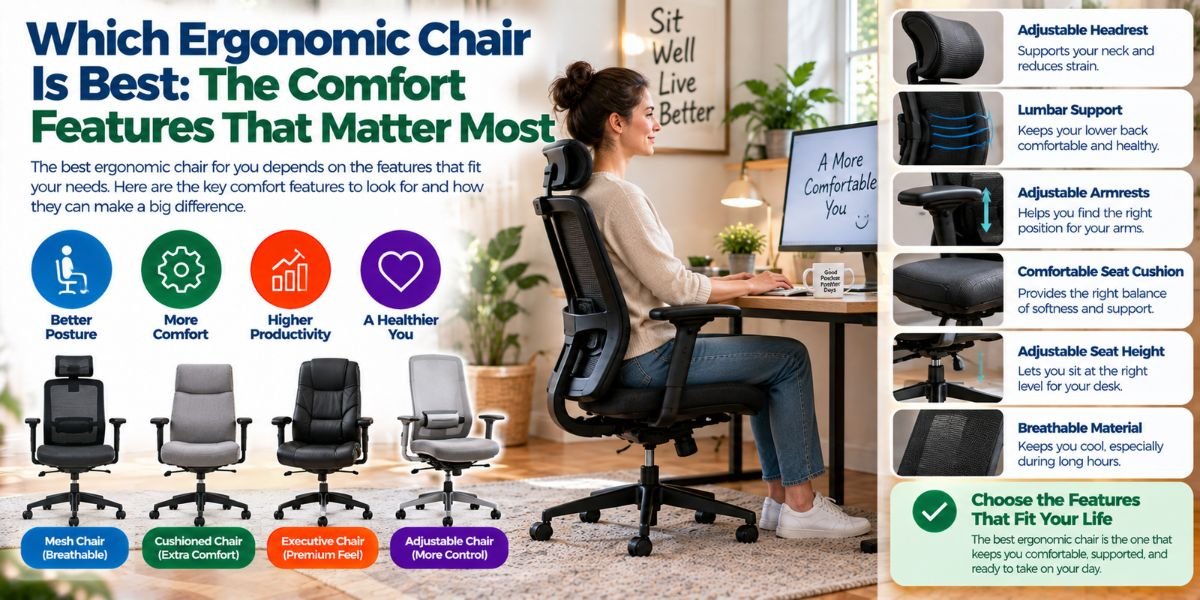
Finding the right office chair can feel harder than it should. There are many chairs, many features, and many big claims.
So, which ergonomic chair is best? For me, the best ergonomic chair is not simply the most expensive one. It is the chair that fits your body, supports your lower back, lets you move, and stays comfortable during long work sessions.
A good chair should also be easy to adjust. Your desk, height, sitting habits, and work time all matter. A chair that feels great for one person may feel wrong for another.
Which Ergonomic Chair Is Best?
The best ergonomic chair is one that gives you good support while letting you sit in a natural position. It should have useful adjustments for seat height, back support, arm position, and recline.
I would also look at seat depth and seat width. These details are easy to miss when shopping online, but they can change how the chair feels after several hours.
A good ergonomic chair should help you keep your feet supported and your back relaxed. You should not need to fight the chair to find a comfortable position.
That is why I would choose fit and adjustability over looks or a long list of features.
What Makes a Chair Truly Ergonomic?
The word “ergonomic” does not mean the same thing as “comfortable.”
A soft chair may feel great for the first 20 minutes. But that does not mean it will support you well during a full workday.
An ergonomic chair should let you adjust important parts to match your body. It should also support different sitting positions instead of forcing you to stay stiff.
Here are the main things I look for.
Adjustable Seat Height
Seat height is one of the first things to check.
Your feet should rest comfortably on the floor. Your knees should not be pushed too high or left hanging. The chair should also work well with the height of your desk.
If the seat is too high, your feet may not feel stable. If it is too low, your legs and desk position may feel awkward.
A wide height range is useful if more than one person will use the chair.
Good Lower-Back Support
Lower-back support is one of the most important features for long desk work.
The backrest should support your lower back without pushing it too hard. Some chairs use fixed support, while others let you change the height or firmness.
I prefer support that can be adjusted. Bodies are different, so one fixed shape cannot work perfectly for everyone.
Good support should feel helpful, not like a hard bump against your back.
Adjustable Armrests
Armrests can make a bigger difference than many people expect.
They can help keep your shoulders relaxed while you type or use a mouse. If they are too high, your shoulders may stay lifted. If they are too low, your arms may lose useful support.
The best setup depends on your desk and body size.
I would look for armrests that can move enough to fit your natural arm position. More adjustment is helpful, but only if the controls are easy to use.
Seat Depth and Width
Seat size is often overlooked.
A seat that is too deep can make it hard to sit back while keeping your feet properly supported. A seat that is too short may not give your legs enough support.
The goal is to have enough seat space without feeling trapped.
This is one reason I would never judge a chair by photos alone. A chair can look large and comfortable but still feel wrong for your body.
Is a Mesh or Cushioned Ergonomic Chair Better?
There is no single winner here.
Mesh chairs can feel cool and allow more airflow. That can be useful if you work in a warm room or dislike a chair that holds heat.
Cushioned seats can feel softer and more familiar. Some people prefer that feeling, especially during long periods of sitting.
The problem is that very soft padding is not always better. A seat can feel comfortable at first but become less pleasant after hours of use.
I would focus on support, pressure, and your own comfort rather than choosing mesh or cushion simply because one sounds more ergonomic.
How Important Is the Recline Feature?
A recline feature can be very useful.
You do not need to sit perfectly upright every minute of the day. Changing your position can make long sitting sessions feel less tiring.
A good recline system should feel smooth. It should let you lean back without making you feel like you are falling away from your desk.
I also like chairs that let me control how much resistance I feel while reclining. A very loose mechanism can feel unstable. A very stiff one can make the feature almost useless.
The best setting is the one that lets you change position with little effort.
Should You Buy an Expensive Ergonomic Chair?
Not always.
Price can bring better materials, stronger adjustment systems, better build quality, and longer warranties. But a higher price does not guarantee a better fit.
I would rather have a well-adjusted mid-priced chair than an expensive chair that does not match my body.
Before spending more, I would ask what the extra money actually gives me.
Does it add better lumbar adjustment? Better seat adjustment? Better armrests? A stronger frame? Better warranty coverage?
If the answer is mostly appearance, I would think twice.
What About Headrests?
Headrests are useful for some people but not essential for everyone.
If you often recline, a headrest can make the chair more comfortable. It can also give your head and neck a place to rest during breaks.
But a headrest should not force your head forward.
For focused desk work, I would pay more attention to the backrest, seat, armrests, and overall fit before worrying about a headrest.
A chair can be highly ergonomic without having one.
What I Would Check Before Buying
When I compare ergonomic chairs, I would not start with the color or design.
I would first check the adjustment range. Then I would look at the seat dimensions, back support, armrests, recline system, and weight rating.
I would also check the return policy.
This matters because a chair can look perfect on paper and still feel wrong after a few hours. A good return option reduces that risk.
I would also measure my desk before buying. A chair that works well with one desk may not work well with another.
Common Ergonomic Chair Mistakes
One common mistake is buying a chair based only on reviews.
Reviews can tell you about build quality and common problems. But comfort is personal.
Another mistake is using every adjustment at once. More adjustment does not mean you need every setting at its maximum.
I would start with seat height. Then adjust the back support and armrests. After that, I would set the recline and other features.
Small changes can make a big difference.
Choosing a Chair That Is Too Soft
A very soft chair can feel inviting.
But softness alone is not good support. If you sink too far into the seat, changing position may become harder.
Look for a seat that feels comfortable while still giving you stable support.Read moreWhich Chair Is Good for Office? 7 Things I Look For Before Choosing One
Ignoring the Desk
Your chair and desk work as a pair.
Even a great chair may feel uncomfortable if your desk is too high or too low. Your keyboard, mouse, monitor, and chair should work together.
This is why chair setup matters almost as much as chair selection.
How I Would Set Up an Ergonomic Chair
I would start by sitting all the way back in the chair.
Then I would adjust the seat height so my feet feel stable on the floor. Next, I would set the back support so my lower back feels supported without being pushed forward.
After that, I would adjust the armrests.
My goal would be to keep my shoulders relaxed and my arms in a natural position while using the keyboard and mouse.
Finally, I would adjust the recline tension and backrest position. I would then use the chair for a while before making more changes.
There is no need to find the perfect setting in one minute.
Ergonomic Chair Features That Matter Most
| Feature | Why it matters | What I would look for |
|---|---|---|
| Seat height | Helps create a stable sitting position | Easy height adjustment |
| Lumbar support | Supports the lower back | Adjustable or well-shaped support |
| Seat depth | Affects leg and back comfort | Enough room without excessive depth |
| Armrests | Helps reduce shoulder strain | Useful height and position adjustment |
| Recline | Lets you change position | Smooth movement and good control |
| Seat material | Affects heat and comfort | Mesh or cushion based on preference |
| Return policy | Helps reduce buying risk | Clear return terms |
The key point is simple: every feature should help the chair fit you.
Who Should Choose a Highly Adjustable Chair?
A highly adjustable chair makes the most sense if you spend many hours at a desk.
It can also be helpful if you are taller, shorter, or have trouble finding a good fit with standard chairs.
If several people share the same chair, adjustability becomes even more useful.
But I would not pay for adjustments that I will never use. The goal is useful control, not a long feature list.
When a Simple Office Chair May Be Enough
Not everyone needs a premium ergonomic chair.
If you work at a desk for a short time each day, a simple chair with good basic support may be enough.
The same can be true if you already have a comfortable setup and do not experience problems during normal use.
I would spend more when the chair is an important part of my daily routine. If I use it for many hours, better adjustment and build quality can be worth paying for.
FAQs
Which ergonomic chair is best for long hours?
The best choice is a chair that fits your body and offers useful adjustments. Focus on seat height, lumbar support, seat depth, armrests, and recline.
Is an expensive ergonomic chair worth it?
It can be, but price alone does not prove quality. Pay more for better fit, useful adjustments, stronger build quality, and better support.
Is mesh better than a cushion?
Neither is always better. Mesh can improve airflow, while cushioning can feel softer. Choose based on your comfort, room temperature, and sitting habits.
Do I need an ergonomic chair with a headrest?
No. A headrest can be useful when reclining, but it is not required for an ergonomic setup. Good seat and back support matter more.
How should I adjust my ergonomic chair?
Start with seat height and make sure your feet feel stable. Then adjust lumbar support, armrests, and recline until your body feels relaxed and supported.
Conclusion
So, which ergonomic chair is best? I would choose the one that fits my body instead of the one with the longest feature list.
Good seat height, proper back support, useful armrests, enough seat space, and a smooth recline system matter most. The chair should also work well with your desk.
Most importantly, comfort should not be judged after five minutes. A chair needs to feel right during real work.
If you spend many hours at a desk, taking time to find the right fit can make your whole workspace feel better.