
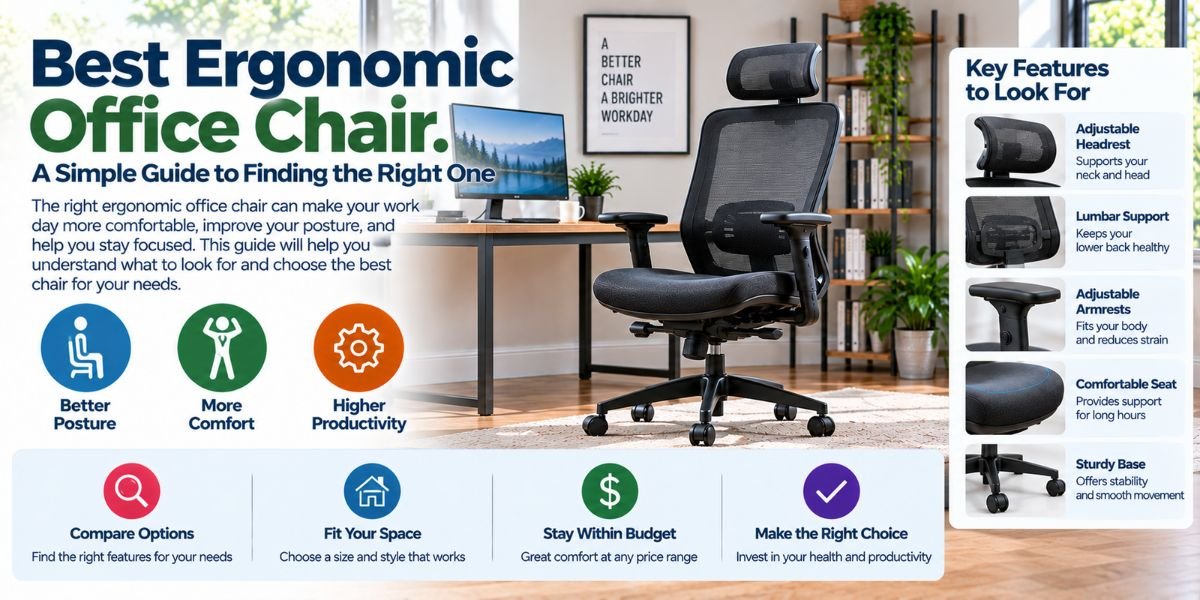
Sitting at a desk for hours can get uncomfortable fast. I have found that the chair matters more than many people think. A good desk can help, but a poor chair can make long work sessions feel much harder.
So, what is the best ergonomic office chair?
The best ergonomic office chair is one that fits your body, supports your lower back, lets you adjust your sitting position, and feels comfortable after long periods of use. There is no single chair that is best for everyone.
The right choice depends on your height, body size, desk setup, work style, and comfort needs. In this guide, I will break down the key things to look for so you can make a smart choice.
What Is the Best Ergonomic Office Chair?
The best ergonomic office chair should support your body while giving you enough freedom to move. It should not force you into one stiff sitting position.
A good chair usually has adjustable seat height, useful lumbar support, armrests, and a backrest that supports your upper and lower back. A seat with the right depth also matters.
Comfort is important, but comfort alone is not enough. A very soft chair may feel great at first but may not give the support you need during a long workday.
For most people, I would start with adjustability. A chair that can be set up for your body is often a better choice than one with many fixed features.
Why Does an Ergonomic Office Chair Matter?
A desk chair supports you for hours at a time. That makes small design details more important than they may seem.
When a chair does not fit well, you may keep changing your position. You may lean forward, slide down, or rest your arms in awkward ways. These habits can make your work setup feel less comfortable.
An ergonomic chair gives you more ways to adjust the fit. This can help you keep a more natural sitting position while working.
The goal is not to sit perfectly still. The goal is to create a setup where you can sit, move, reach, and work with less strain.
What Should I Look for in an Ergonomic Office Chair?
There are several features I would check before buying a chair. Some matter more than others.
Adjustable Seat Height
Your feet should be able to rest comfortably on the floor while you sit. Your knees should also have enough room to sit naturally.
A seat that is too high can leave your feet unsupported. A seat that is too low can affect your leg and desk position.
That is why adjustable seat height is one of the first features I check.
Lumbar Support
Your lower back needs support, especially during long desk sessions.
A chair with adjustable lumbar support gives you more control over where that support sits. This can be useful because people have different body shapes.
Fixed lumbar support can still work well. But it may not fit everyone in the same way.
Seat Depth
Seat depth is easy to overlook.
If the seat is too deep, you may have trouble sitting back while keeping your feet in a good position. If it is too short, your legs may not feel well supported.
A seat with adjustable depth can make it easier to find a comfortable fit.
Armrests
Armrests can help support your arms while you work.
The key is adjustability. Your armrests should allow your arms to rest naturally without forcing your shoulders up.
Fixed armrests can work if they match your desk and body well. Adjustable armrests give you more options.
Backrest Support
The backrest should support your back without making you feel trapped.
Some people prefer an upright chair for focused desk work. Others like a backrest that can recline during breaks or reading.
I prefer having some movement. Being able to change position can make a chair feel more useful throughout the day.
How Do I Know if an Ergonomic Chair Fits Me?
Chair fit is personal. A chair that feels perfect for one person may feel wrong for another.
Start with the seat. Sit back in the chair and check whether your feet can rest comfortably on the floor.
Then check your knees, hips, back, and arms. You should not feel like you have to stretch, reach, or lift your shoulders to use the chair.
Your lower back should also meet the chair’s support area without forcing you into an awkward position.
If possible, test the chair before buying it. Even a long list of features cannot tell you exactly how a chair will feel with your body.
Does a More Expensive Ergonomic Chair Mean It Is Better?
Not always.
Price can reflect better materials, more adjustments, stronger parts, or a longer warranty. But a high price does not guarantee a good personal fit.
I would rather choose a chair with the adjustments I need than pay more for features I will never use.
Think about how you work first.
If you sit for eight hours a day, adjustability may be worth paying for. If you only use your desk for short periods, you may not need every advanced feature.
Mesh vs. Cushioned Office Chairs
The seat and back material can change how a chair feels.
Mesh chairs allow more airflow. This can be useful if you work in a warm room or dislike the feel of a thick cushion.
Cushioned chairs can feel softer and more familiar. They may also suit people who prefer a padded seat.
Neither material is automatically better.
I would focus on support, fit, seat comfort, and build quality first. Then choose the material that matches your room and personal comfort.
Should an Ergonomic Chair Recline?
A reclining backrest can be useful because you do not need to stay in one position all day.
A chair that allows some recline can work well for reading, thinking, meetings, or short breaks.
The important point is control. You should be able to return to an upright working position without fighting the chair.
For normal desk work, I would look for a chair with a stable upright position and smooth backrest movement.
Common Ergonomic Office Chair Problems
Even a well-designed chair can have drawbacks.
The Seat Feels Too Hard
Some ergonomic chairs use firm seats. This can feel strange if you are used to a very soft chair.
Give yourself time to adjust, but do not ignore ongoing discomfort. A chair still needs to suit your body.
The Lumbar Support Feels Wrong
Too much lumbar support can feel just as annoying as too little.
If the chair allows adjustment, move the support until it meets your lower back in a natural spot. If it is fixed and feels wrong, the chair may simply not be a good match.
The Armrests Get in the Way
Armrests that are too high can push your shoulders upward. Armrests that are too wide may make it harder to sit close to your desk.
Adjustable armrests can solve many of these problems.
The Chair Does Not Fit the Desk
A good chair cannot fix a poor desk setup.
Your chair and desk should work together. If your desk is too high or too low, you may still feel uncomfortable even with a quality ergonomic chair.
Ergonomic Office Chair Features Compared
| Feature | Why It Matters | What I Would Check |
|---|---|---|
| Seat height | Helps match the chair to your legs and desk | Feet can rest comfortably |
| Lumbar support | Supports the lower back | Position and adjustment |
| Seat depth | Affects leg and hip comfort | Enough support without being too deep |
| Armrests | Supports the arms | Height and width adjustment |
| Backrest | Supports your back | Upright support and recline |
| Seat material | Changes comfort and airflow | Mesh or cushion preference |
| Recline | Allows position changes | Smooth and controlled movement |
What Is the Best Ergonomic Office Chair for Long Hours?
For long workdays, I would focus on adjustability before extra features.
A good long-hour chair should let you adjust the seat height and support your back. The seat should fit your legs, and the armrests should work with your desk.
Breathable material may also matter if you sit for many hours in a warm room.
Most of all, the chair should let you change position. Even a well-designed chair is not a reason to stay still all day.
Getting up, walking around, and taking short breaks are still useful parts of a good desk routine.Read moreWhat Is a Good Home Office Chair? 9 Things I Look For Before Buying
What Is the Best Ergonomic Office Chair for a Home Office?
A home office has different needs from a large commercial office.
Space can be limited. You may also use the same room for other tasks. In that case, chair size, movement, and storage can matter.
I would measure the space around your desk before buying. Check the chair’s overall width and depth, not just the seat size.
Also think about how you use the room. If your desk is in a bedroom or living area, a large office chair may feel out of place.
How I Would Choose an Ergonomic Office Chair
I would start with the basics.
First, I would check the chair’s size and adjustment range. Then I would look at lumbar support, seat depth, armrests, and backrest movement.
Next, I would think about the materials. A breathable mesh chair may make more sense in a warm workspace. A padded chair may suit someone who prefers a softer feel.
After that, I would look at build quality, warranty, and return options.
I would not choose a chair based only on looks or a long feature list. A chair is something you use for hours. Fit should come first.
Simple Tips for Using an Ergonomic Office Chair
Buying the right chair is only part of the setup.
Start by adjusting the seat height so your feet feel stable. Then set the backrest and lumbar support to meet your body.
Place the armrests so your shoulders can stay relaxed. Keep your desk and monitor at a comfortable working height.
Do not feel that you must sit in one perfect pose all day. Change your position when you need to.
A good chair should support movement, not prevent it.
Who Should Buy an Ergonomic Office Chair?
An ergonomic office chair can make sense for anyone who spends a lot of time at a desk.
It can be especially useful for people who work from home, study for long periods, use a computer daily, or spend much of the workday in meetings.
If you only sit at a desk for a few minutes each day, advanced adjustments may not be worth the extra cost.
The best choice depends on how often you use the chair and how well it fits your body.
FAQs
What is the best ergonomic office chair?
The best ergonomic office chair is one that fits your body and gives you useful adjustments. Look for good back support, the right seat depth, adjustable height, and comfortable arm support.
What makes an office chair ergonomic?
An ergonomic chair is designed to support your body while allowing useful adjustment and movement. Seat height, lumbar support, seat depth, armrests, and backrest movement all matter.
Is an ergonomic chair good for long hours?
Yes, a well-fitted ergonomic chair can be a good choice for long desk sessions. It should support your body without forcing you into one fixed position.
Is mesh or cushion better for an ergonomic office chair?
Both can work well. Mesh often gives better airflow, while a cushioned seat may feel softer. Your comfort, support needs, and room temperature should guide the choice.
How much should I spend on an ergonomic office chair?
There is no single price that works for everyone. I would set a budget based on how often you use the chair, then focus on fit, adjustment, support, build quality, and warranty.
Conclusion
So, what is the best ergonomic office chair?
It is the chair that fits your body, supports your back, works with your desk, and lets you adjust your sitting position. You do not need the chair with the longest feature list or the highest price.
Start with fit and support. Then look at materials, movement, durability, and other features.
For me, the biggest lesson is simple: a good ergonomic chair should make your work setup easier to live with. It should support you without demanding constant attention. That is what makes a chair worth choosing.