
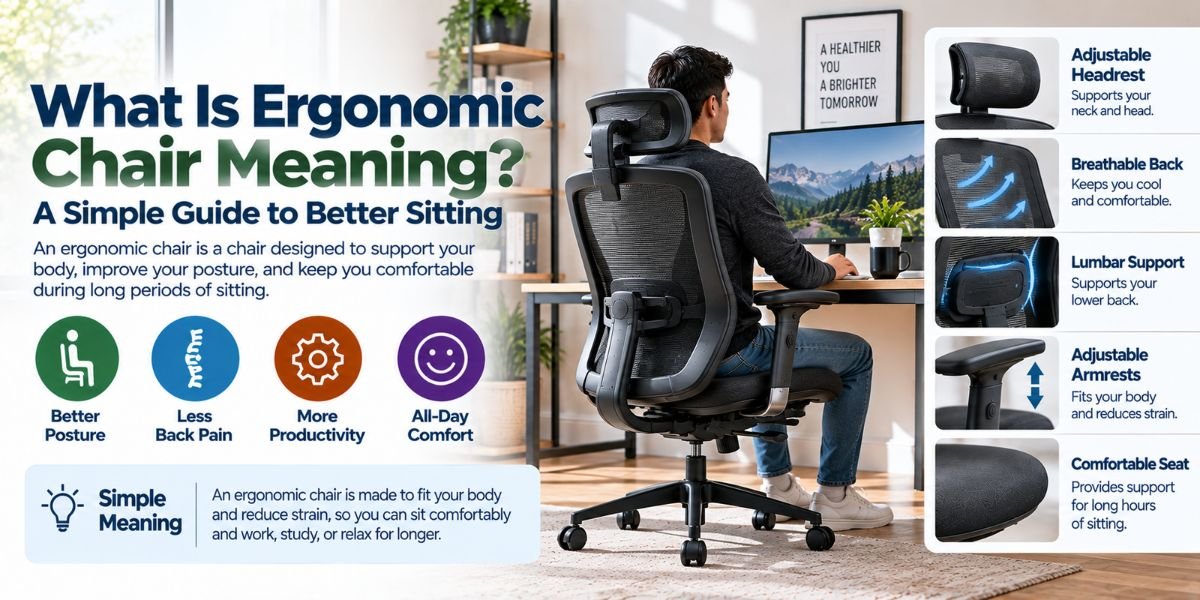
Sitting for hours can feel easy at first. After a while, your back, neck, or shoulders may tell a different story. This is where an ergonomic chair can help.
So, what is ergonomic chair meaning? An ergonomic chair is a chair designed to support your body while you sit. It helps you keep a more natural sitting position. It can also let you adjust the chair to fit your body and work style.
I think the easiest way to understand an ergonomic chair is to think about support and fit. A good chair should not force your body into one fixed position. Instead, it should help you sit in a way that feels comfortable and balanced.
What Is Ergonomic Chair Meaning?
The simple meaning of an ergonomic chair is a chair made to support the human body during sitting.
The word “ergonomic” means designed around how people use something. With a chair, this means the design considers your back, legs, arms, neck, and sitting position.
An ergonomic chair often has adjustable parts. These may include seat height, back support, armrests, and seat depth. Some chairs also have adjustable headrests and reclining features.
The goal is not to make you sit perfectly still. In fact, changing your sitting position can be useful. The chair should give you support while still allowing normal movement.
How Is an Ergonomic Chair Different From a Regular Chair?
A basic chair may have one fixed height and one fixed back position. You sit in it as it comes.
An ergonomic chair usually gives you more ways to adjust the fit. This matters because people have different heights, leg lengths, body shapes, and work habits.
For example, a chair that feels fine for one person may feel too high for another. The same chair may also have a seat that is too deep for someone with shorter legs.
This is why I would not judge an ergonomic chair by looks alone. The ability to adjust the chair can matter more than a fancy design.
What Makes a Chair Ergonomic?
Several features can make a chair more ergonomic. Not every chair will have all of them, and you do not always need every feature.
Adjustable Seat Height
Seat height is one of the most useful adjustments.
Your feet should be able to rest on the floor or on a suitable footrest. Your knees should also feel comfortable rather than being pushed too high or left hanging.
A chair that is too high can make it hard to place your feet properly. A chair that is too low can change your sitting position in other ways.
Good Back Support
Back support helps support your torso while you sit.
Many ergonomic chairs have a backrest shaped to follow the general curve of the back. Some also have adjustable lumbar support.
Lumbar support focuses on the lower part of your back. The right position can feel more supportive during long work sessions.
Adjustable Armrests
Armrests can help support your arms and reduce the need to hold them up all day.
The useful part is adjustability. Your armrests should work with your desk and sitting position.
If they are too high, they may make your shoulders rise. If they are too low, they may provide little useful support.
Seat Depth
Seat depth is easy to overlook.
A deep seat can feel roomy, but it may not work well for every person. If the front of the seat presses against the area behind your knees, sitting can become uncomfortable.
A seat with the right depth lets you sit back while still leaving some space behind your knees.
Recline and Tilt
Some ergonomic chairs let you lean back.
This can be useful when reading, thinking, or taking a short break from typing. A chair does not have to keep your back straight at one fixed angle all day.
Movement can be part of good sitting habits.
Why Are Ergonomic Chairs Popular?
Ergonomic chairs are popular because many people spend a large part of the day sitting.
Office workers may sit at a desk for several hours. The same is true for students, gamers, remote workers, and people who use a computer at home.
A chair that fits well can make the work area feel more comfortable. It can also make it easier to maintain a useful sitting position.
Still, an ergonomic chair is not a magic fix. Your desk height, monitor position, keyboard, mouse, and sitting habits also matter.
Does an Ergonomic Chair Improve Posture?
An ergonomic chair can support better sitting posture, but it cannot control your posture for you.
Good posture is not about staying stiff. A more useful goal is to keep your body in a comfortable and balanced position.
Your back should have support. Your feet should have support. Your shoulders should stay relaxed. Your arms should be able to work without excessive reaching.
The chair can help create these conditions, but you still need to adjust it and change positions during the day.
How Should an Ergonomic Chair Fit Your Body?
Chair fit is personal.
Start with the seat height. Adjust it so your feet can rest comfortably on the floor. Then check the seat depth and back support.
Next, adjust the armrests if the chair has them. They should support your arms without forcing your shoulders up.
If the chair reclines, find a position that feels natural for your task. You may want a more upright position for typing and a more relaxed position for reading.
I find it helpful to make small adjustments instead of changing everything at once. This makes it easier to notice what actually improves the fit.
Can an Ergonomic Chair Prevent Back Pain?
An ergonomic chair may help reduce discomfort caused by poor sitting conditions, but it cannot guarantee that you will avoid back pain.
Back discomfort can have many causes. Sitting for long periods is only one possible factor.
A good chair can provide support, but movement still matters. Standing up, walking around, and changing your sitting position can break up long periods of sitting.
If you have ongoing or severe pain, a chair should not be treated as a medical solution.
What Should You Check Before Buying an Ergonomic Chair?
Before buying one, I would focus on fit rather than the number of features.
First, check the chair’s height range. Make sure it can work with your body and desk.
Then look at the seat size and depth. A very large seat is not always better. You need a seat that supports you without getting in the way of your legs.
Back support is another key point. Check whether the chair supports the lower back in a comfortable position.
Also consider the armrests, recline range, seat material, weight capacity, and available adjustments. These details can affect how useful the chair feels after many hours of use.
Ergonomic Chair vs. Office Chair
An office chair is a broad term. It can describe almost any chair made for office work.
An ergonomic office chair is more specific. It is designed with body support and adjustability in mind.
This means an ergonomic chair is usually a type of office chair, but not every office chair is highly ergonomic.
When shopping, I would look past labels. A chair called “ergonomic” should still be checked for useful adjustments and a good fit.
Is an Ergonomic Chair Worth It?
An ergonomic chair can be worth the money if you spend many hours sitting at a desk.
The biggest benefit is usually not one special feature. It is the ability to adjust the chair so it works better with your body and workspace.
For someone who sits only for short periods, a basic chair may be enough. For someone who works from home every day, studies for long hours, or spends much of the day at a computer, better support may matter more.
The right choice depends on how much you sit and how well the chair fits you.Read moreWhat Is the Best Ergonomic Office Chair? A Simple Guide to Finding the Right One
Common Ergonomic Chair Mistakes
Buying an ergonomic chair does not automatically make a workspace ergonomic.
One common mistake is setting the chair too high. Another is using a seat that is too deep.
Some people also place their monitor too low or too far away. Others use armrests that push their shoulders upward.
Another mistake is sitting in the same position for hours. Even a well-designed chair cannot replace regular movement.
A chair works best as part of a complete desk setup.
Simple Tips for Using an Ergonomic Chair
Start by adjusting the chair before you begin a long work session.
Keep your feet supported. Use the backrest instead of sitting far forward all day. Adjust the armrests so your shoulders can stay relaxed.
Place your monitor where you can view it without constantly bending your neck. Keep your keyboard and mouse close enough that you do not need to reach far.
Most of all, move often. Stand up when you can. Walk for a few minutes. Change your sitting position.
Small changes can make a desk setup feel much better.
Ergonomic Chair Features at a Glance
| Feature | What it does | Why it matters |
|---|---|---|
| Seat height | Raises or lowers the seat | Helps your feet and legs fit the desk |
| Lumbar support | Supports the lower back | Can improve back support |
| Seat depth | Changes usable seat length | Helps the seat fit different body sizes |
| Armrests | Supports the arms | Can help keep shoulders relaxed |
| Recline | Lets the backrest lean back | Allows more sitting positions |
| Headrest | Supports the head and neck | May add comfort in reclined positions |
Who Should Consider an Ergonomic Chair?
An ergonomic chair can be a good choice for people who spend many hours at a desk.
It may suit remote workers, office workers, students, gamers, writers, and anyone who uses a computer for long periods.
It can also be useful for people who have trouble getting comfortable in a fixed-position chair.
However, comfort is personal. A chair that works well for one person may not feel right for another. That is why adjustability and proper fit are so important.
FAQs
What is ergonomic chair meaning?
An ergonomic chair is designed to support the body while sitting. It often has adjustable features that help the chair fit your body and workspace.
What does ergonomic mean in a chair?
Ergonomic means the chair is designed around how people sit and work. It usually focuses on support, comfort, movement, and adjustability.
Is an ergonomic chair good for long hours?
Yes, an ergonomic chair can be useful for long work sessions because it can provide better support and allow you to adjust the fit. Regular movement is still important.
Does an ergonomic chair fix bad posture?
No. An ergonomic chair can support a better sitting position, but it cannot fix posture by itself. Your desk setup and daily sitting habits also matter.
What is the most important feature of an ergonomic chair?
There is no single best feature for everyone. Adjustable seat height, good back support, and a proper seat fit are strong places to start.
Conclusion
So, what is ergonomic chair meaning? In simple terms, it is a chair designed to support your body and give you more control over your sitting position.
The best ergonomic chair is not always the most expensive one. It is the one that fits your body, works with your desk, and gives you the support you need.
For long hours at a computer, small details can make a real difference. Start with seat height, back support, seat depth, and arm position. Then remember to move during the day.
A good chair should support your work, not make sitting feel like another task.