
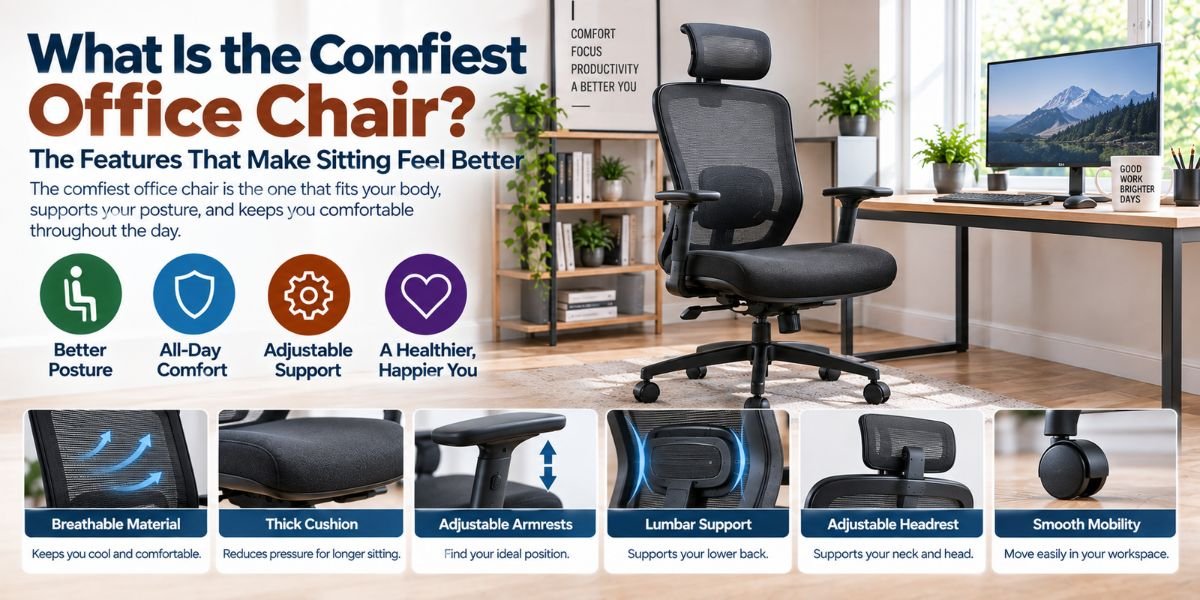
If you sit at a desk for hours, chair comfort matters more than looks. A soft seat may feel great for 10 minutes. But that does not always mean it will feel good after a full workday.
So, what is the comfiest office chair?
For most people, the comfiest office chair is one that fits the body well and has enough adjustment. It should support the lower back, let your feet rest firmly, give your thighs room, and let you change your sitting position. A chair that fits you is often more comfortable than a chair with the most padding.
I looked at the features that matter most for long desk work. The biggest lesson is simple: comfort is not just about softness. It is about fit, support, movement, and easy adjustment.
What Is the Comfiest Office Chair?
The comfiest office chair is usually an ergonomic chair with adjustable seat height, seat depth, lumbar support, back recline, and armrests.
The best chair should let you sit with your back supported and your feet stable. The seat should not push into the back of your knees. The backrest should support the natural curve of your lower back.
There is no single chair that feels perfect for everyone. Body size, leg length, desk height, work habits, and personal preference all change what feels comfortable.
That is why adjustment is so important.
A chair can have a thick cushion and still feel bad after a few hours. Another chair may feel firm at first but stay more comfortable because it keeps your body in a better position.
Why Comfort Is More Than a Soft Seat
When I think about a comfortable office chair, I do not look at padding alone.
A very soft chair can feel cozy when you first sit down. But if the seat is too deep, you may slide forward. If the backrest does not support your lower back, you may start leaning or slouching.
A good chair should spread support across your body without creating pressure in one spot.
The seat should support your thighs without pressing behind your knees. Your back should stay supported when you work. Your arms should have a place to rest without forcing your shoulders upward.
These small details can make a big difference during a long work session.
The Most Important Comfort Features
Adjustable Seat Height
Seat height is one of the first things I would check.
Your feet should be able to rest firmly on the floor or on a footrest. Your legs should feel supported without the seat pressing into the back of your knees.
A chair that is too high can leave your feet unsupported. A chair that is too low can put you in an awkward position at the desk.
The right height also depends on your desk. Your chair and desk need to work together.
Adjustable Seat Depth
Seat depth is easy to overlook.
A seat that is too deep may force shorter users to sit away from the backrest. That can reduce lower-back support. A seat that is too short may not give taller users enough thigh support.
The best setup lets you sit back while keeping a comfortable gap between the seat edge and the back of your knees.
This is one reason adjustable seat depth can be more useful than simply buying a chair with a large seat.
Good Lumbar Support
Your lower back needs support, but more support is not always better.
The lumbar area should fit the natural curve of your lower back. Adjustable lumbar support is useful because people have different body shapes.
I would be careful with chairs that have very hard lumbar pieces. A support that feels aggressive can become annoying after hours of sitting.
The goal is steady support, not a constant pressure point.
A Backrest That Reclines
A chair does not need to lock you into one upright position all day.
A reclining backrest gives you another way to sit. You can lean back while reading, taking a call, or thinking through a task. It can also help you change your posture during the day.
This matters because staying in the exact same position for hours is not ideal.
A comfortable chair should let you move.
Adjustable Armrests
Armrests can make a chair feel much better when they fit your body.
They should let your arms rest without pushing your shoulders up. They should also avoid getting in the way when you move closer to the desk.
Height adjustment is useful. More movement can be helpful if you change tasks often.
Still, armrests are not automatically good just because a chair has them. Poorly placed armrests can make your shoulders and arms feel awkward.
Mesh vs. Cushioned Office Chairs
The seat material can change how a chair feels.
Mesh chairs are often appealing because they allow more airflow. This can be useful in a warm room or during long work sessions.
But mesh can feel different from a padded seat. Some people like the firm support. Others prefer the softer feel of foam.
Cushioned chairs can feel warmer and softer. The quality and shape of the foam matter, though. A thick cushion is not automatically a better cushion.
For me, the better choice would depend on how long I sit, how warm my workspace gets, and how the seat feels after extended use.
Is a Headrest Needed for Comfort?
Not always.
A headrest can be useful when you recline often. It can give your head and neck somewhere to rest during breaks or relaxed sitting.
But if you mainly sit upright while typing, a headrest may not add much value.
In fact, a poorly placed headrest can become annoying. It may push your head forward or interfere with your natural sitting position.
I would treat a headrest as an optional comfort feature, not the main reason to choose a chair.
The Best Office Chair for Long Hours
For long hours, I would focus on adjustment before appearance.
Look for a chair that lets you adjust:
- Seat height
- Seat depth
- Lumbar support
- Backrest angle
- Armrest height
- Recline tension
A strong base and smooth movement also matter. You should be able to move around your workspace without fighting the chair.
The chair should also match your body size. A large chair is not automatically better for a smaller person. A compact chair may not provide enough support for a taller user.
Comfort starts with fit.
How to Set Up an Office Chair for Better Comfort
Even a good chair can feel uncomfortable if it is set up poorly.
Start by adjusting the seat height. Place your feet firmly on the floor. Then sit back and adjust the backrest so your lower back feels supported.
Next, check the seat depth. Your legs should have good support, but the front edge should not press into the back of your knees.
Set the armrests so your shoulders can relax. Your elbows should stay close to your body while you work.
Then check your desk and monitor.
Your chair cannot fix a poorly arranged workstation. The monitor should be positioned so you can view it without constantly bending or twisting your neck. Your keyboard and mouse should also be close enough that you do not need to reach far.
Do You Need to Sit Perfectly All Day?
No.
One thing I would not do is treat a chair like a device that forces perfect posture.
People move. We lean. We recline. We shift from side to side. That is normal.
A good office chair should support movement instead of fighting it.
Even with a good chair, it helps to stand up, walk around, stretch, and change position during the day. A comfortable chair should make work easier, but it should not encourage you to stay completely still for hours.
Common Office Chair Comfort Problems
The Seat Feels Too Hard
A firm seat is not always bad. But if you feel strong pressure in one area, the seat may not suit your body.
Check the seat depth and height before adding extra padding.
Your Lower Back Gets Tired
First, check the lumbar support.
It may be too high, too low, too hard, or simply not shaped well for you. Try adjusting it before deciding that the chair itself is uncomfortable.Read moreWhat Is the Best Type of Office Chair? A Simple Guide to Finding the Right Fit
Your Legs Feel Numb
Check the seat height and depth.
A seat that is too high can leave your feet unsupported. A seat that is too deep can press against the back of your legs.
A footrest may help if your desk requires a higher chair position.
Your Shoulders Feel Tight
Look at the armrests.
If they are too high, your shoulders may stay lifted. If they are too low, you may lean or reach for support.
Your keyboard and mouse position also matter.
What Should You Look for in the Comfiest Office Chair?
| Feature | Why it matters |
|---|---|
| Adjustable seat height | Helps you place your feet and legs correctly |
| Adjustable seat depth | Helps fit different leg lengths |
| Lumbar support | Supports the lower-back curve |
| Reclining backrest | Lets you change sitting positions |
| Adjustable armrests | Helps your arms and shoulders relax |
| Comfortable seat | Reduces pressure during long work sessions |
| Breathable material | Can help reduce heat buildup |
| Strong base | Improves stability and movement |
| Good fit | Makes all other features work better |
The key point is that no single feature creates comfort. The whole chair needs to fit you.
How I Would Choose a Comfortable Office Chair
I would start with fit, not brand name.
First, I would check whether the chair fits my height and leg length. Then I would look at seat depth, lumbar support, armrests, and recline.
I would also pay attention to how much adjustment the chair offers. More adjustments do not always mean a better chair, but useful adjustments make it easier to find a good position.
If possible, I would sit in the chair before buying it. Comfort is personal. A chair that feels perfect to one person may feel wrong to another.
I would also avoid choosing a chair only because it looks soft or expensive.
The best chair is the one that supports your body without making you think about the chair while you work.
FAQs
What is the comfiest office chair for long hours?
The comfiest chair for long hours is usually one with adjustable height, seat depth, lumbar support, recline, and armrests. The right fit matters more than padding alone.
Is a soft office chair more comfortable?
Not always. A very soft seat may feel good at first but can lack useful support. A firm, well-shaped seat can feel better during long work sessions.
Is lumbar support important in an office chair?
Yes. Good lumbar support helps support the natural curve of the lower back. Adjustable support is useful because body shapes differ.
Should an office chair have a headrest?
A headrest is helpful if you often recline or want extra support while resting. It is not required for comfortable upright desk work.
Is a mesh office chair more comfortable than a padded chair?
It depends on the person. Mesh can feel cooler and more breathable, while padded seats can feel softer. Try to choose based on your body and workspace.
Conclusion
So, what is the comfiest office chair?
It is not always the softest, biggest, or most expensive chair. The comfiest office chair is the one that fits your body and lets you adjust the parts that matter.
I would put seat fit, lumbar support, adjustability, and movement at the top of the list. Once those basics are right, features like mesh, padding, armrests, and a headrest can help fine-tune the experience.
Most of all, do not forget the setup. Even a great chair can feel bad when the seat, desk, monitor, and keyboard are poorly positioned.
For long hours at a desk, comfort comes from the whole setup—not just the chair.