
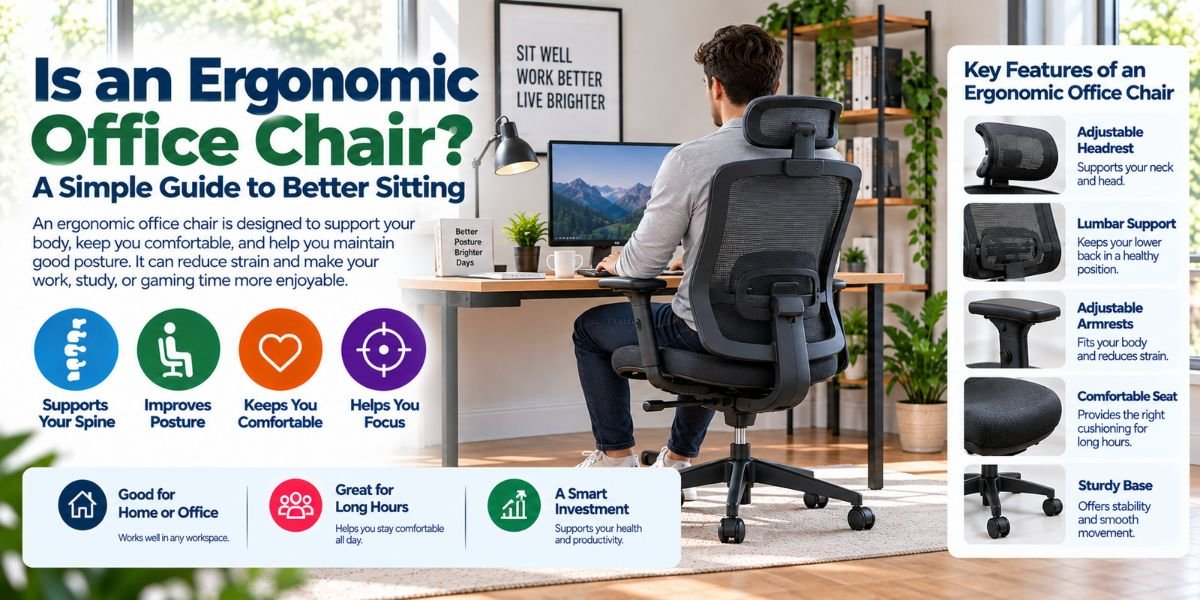
Sitting at a desk for hours can feel easy at first. After a while, though, your back, neck, shoulders, or legs may start to complain. This is where an ergonomic office chair can help.
But what is an ergonomic office chair, really? It is a chair made to support your body while you sit and work. It lets you adjust key parts of the chair to fit your body and your desk.
In this guide, I will explain what an ergonomic office chair does, how it works, what features matter, and how to choose one without wasting money.
What Is an Ergonomic Office Chair?
An ergonomic office chair is a desk chair designed to support your body in a more natural sitting position. It usually has adjustable parts for the seat, back, arms, and height.
The goal is simple. The chair should fit you, not force your body to fit the chair.
A good ergonomic office chair can help you keep your feet supported, your back comfortable, and your arms in a better position while you work.
It does not mean the chair will fix every back or neck problem. Your desk height, monitor position, movement, and sitting habits also matter.
How Is an Ergonomic Chair Different From a Normal Office Chair?
The main difference is adjustability.
A basic office chair may let you change the seat height. An ergonomic chair often gives you more ways to adjust the chair to your body.
These may include:
- Seat height
- Seat depth
- Backrest position
- Lumbar support
- Armrest height
- Armrest angle
- Recline tension
- Recline position
- Headrest position
This extra control can make a big difference during a long workday.
For example, a chair may feel fine for 20 minutes but become uncomfortable after several hours. An ergonomic design aims to keep your body better supported for longer periods.
Why Is an Ergonomic Office Chair Important?
The biggest reason is comfort during long periods of desk work.
When a chair does not fit your body, you may lean forward, slump, raise your shoulders, or sit with your legs in an awkward position. These habits can make long work sessions feel much harder.
An ergonomic chair gives you more control over your sitting position.
I also like the fact that a good chair can support small changes in posture. You do not have to sit like a statue all day. Being able to recline, shift your position, and move naturally is useful.
The chair is only one part of a healthy desk setup, but it is an important one.
What Features Should an Ergonomic Office Chair Have?
Not every ergonomic chair needs every feature. Still, some features are more useful than others.
Adjustable Seat Height
Seat height is one of the most important adjustments.
Your feet should be able to rest firmly on the floor or another stable surface. Your knees should also feel comfortable rather than being pushed too high or left dangling.
A chair with adjustable height makes it easier to match the chair to your body and desk.
Adjustable Seat Depth
Seat depth is easy to overlook.
If the seat is too deep, you may have trouble sitting back against the backrest while keeping your legs comfortable. If it is too short, your thighs may not get enough support.
An adjustable seat depth can help you find a better fit.
Lumbar Support
Lumbar support is designed to support the lower part of your back.
Some chairs have fixed lumbar support. Others let you change its height or firmness.
The right setting depends on your body. More support is not always better. The goal is to feel supported without pressure.
Adjustable Armrests
Armrests can help support your arms and reduce the need to hold your shoulders up.
Adjustable armrests are more useful because people have different arm lengths and desk heights.
Your arms should feel relaxed when you use your keyboard and mouse. If the armrests are too high, they can push your shoulders upward.
Reclining Backrest
A backrest that reclines gives you more freedom to change your sitting position.
I find this useful during long desk sessions. Sometimes I want to sit upright while typing. At other times, a slight recline feels better when reading.
A good recline system should feel smooth and controlled.
Seat Padding
Seat padding affects comfort in a very direct way.
Too little padding can feel hard during long sessions. Too much soft padding can also be a problem because it may not give stable support.
The best choice depends on your body and personal preference.
Breathable Backrest
Some ergonomic chairs use mesh instead of a padded back.
Mesh can allow more airflow around your back. This can be useful if you work in a warm room or spend many hours in your chair.
A padded back may feel softer, while mesh can offer a cooler feel. Neither is automatically better for everyone.
How Should an Ergonomic Office Chair Fit You?
The best ergonomic chair is not simply the one with the most features. It is the one you can adjust to fit your body.
Start with the seat height.
Your feet should have solid support. Then sit back and adjust the backrest so your back feels supported.
Next, check the seat depth. You should be able to sit comfortably against the backrest without the front edge of the seat pressing into the back of your knees.
Then adjust the armrests.
Your shoulders should stay relaxed while your arms rest comfortably. Your keyboard and mouse should also be easy to reach.
Finally, adjust the recline and lumbar support to a position that feels natural.
Does an Ergonomic Office Chair Improve Posture?
It can make better posture easier, but the chair cannot control your body.
A well-adjusted chair can support your back and help you avoid some awkward sitting positions. However, you can still slump in an expensive ergonomic chair.
Your desk setup matters too.
Your monitor should be positioned so you do not need to keep bending your neck. Your keyboard and mouse should be within easy reach. Your feet should have stable support.
Most importantly, remember to move.
Even a very good chair does not make sitting still for hours ideal.
Common Problems With Ergonomic Office Chairs
Ergonomic chairs are not perfect.
One common problem is having too many adjustments. A chair can look impressive but still feel confusing if you do not know how to set it up.
Another issue is poor fit. A chair may have great features but still feel wrong for your body.
Some chairs can also be expensive. Paying more does not always mean getting better comfort.
There is also the problem of overusing lumbar support or armrests. If an adjustment creates pressure or discomfort, it may need to be changed.
The lesson is simple: more features do not always mean a better chair.Read moreIs It Worth Buying an Ergonomic Chair? My Honest Guide Before You Spend Your Money
Ergonomic Office Chair vs. Gaming Chair
Gaming chairs often focus on appearance, deep seats, and a sporty design. Ergonomic office chairs usually focus more on adjustability and everyday work comfort.
That does not mean one is always better.
A gaming chair can work well for desk use if it fits your body and gives you the support you need. An ergonomic office chair can also be a great choice for gaming.
For long workdays, I would focus less on the label and more on the actual fit.
Look at the seat, back support, armrests, recline, and adjustment range.
What Should You Look for When Buying One?
Before buying an ergonomic office chair, think about how you will use it.
If you work eight hours a day at a desk, adjustability should be high on your list. If you only sit for short periods, you may not need every advanced feature.
I would check these points first:
| Feature | Why It Matters |
|---|---|
| Seat height | Helps your feet and legs stay supported |
| Seat depth | Helps the seat fit your leg length |
| Lumbar support | Supports the lower back |
| Armrests | Helps keep the arms and shoulders relaxed |
| Recline | Lets you change sitting positions |
| Backrest | Supports the back while working |
| Seat padding | Affects comfort during long use |
| Build quality | Matters for regular, long-term use |
Also check the chair’s size limits and adjustment range. A chair that works well for one person may not work well for another.
How I Would Set Up an Ergonomic Office Chair
I would start with the basics instead of changing every setting at once.
First, set the seat height. Make sure your feet are supported.
Then sit fully back in the chair. Adjust the backrest and lumbar support until your lower back feels supported without feeling pushed forward.
Next, set the armrests so your shoulders can relax.
After that, adjust the recline. I would keep enough freedom to change position during the day.
Then check the desk and monitor.
This last step is important. A chair cannot make up for a desk that is too high or a monitor that forces you to bend your neck.
Can You Use an Ergonomic Office Chair All Day?
Yes, you can use one for long work sessions, but that does not mean you should stay seated without moving.
Change your sitting position from time to time. Stand up when you can. Walk around during breaks. Even small movements can make a long desk day feel better.
Think of an ergonomic chair as part of your workspace, not a replacement for movement.
Are Expensive Ergonomic Chairs Worth It?
Not always.
A higher price can bring better materials, more adjustments, stronger parts, or a longer expected service life. But price alone does not tell you how well a chair will fit your body.
A less expensive chair may feel better to you than a costly model.
I would spend money on useful adjustments before paying extra for features that look impressive but do not help your daily work.
Comfort, fit, support, and build quality matter more than a long feature list.
Who Should Consider an Ergonomic Office Chair?
An ergonomic office chair can make sense for people who spend a lot of time at a desk.
It may be useful for:
- Remote workers
- Office workers
- Students
- Writers
- Programmers
- Designers
- Gamers
- People who work from a home office
If you only use a desk for a few minutes each day, advanced ergonomic features may not be as important.
For long daily use, however, getting the right fit can be a smart upgrade.
FAQs About Ergonomic Office Chairs
What is an ergonomic office chair?
An ergonomic office chair is designed to support your body while you sit and work. It usually has adjustable features that help you find a more comfortable sitting position.
Is an ergonomic chair better for long hours?
It can be more comfortable for long desk sessions because you can adjust the chair to your body. You should still take breaks and change positions during the day.
What is the most important feature of an ergonomic chair?
There is no single best feature for everyone. Seat height, seat depth, back support, and armrest adjustment are all important for getting a good fit.
Do ergonomic chairs fix back pain?
An ergonomic chair is not a medical treatment and cannot promise to fix back pain. A better chair may improve comfort, but ongoing pain should be discussed with a qualified health professional.
Should an ergonomic office chair have a headrest?
A headrest is optional for many people. It can be useful when reclining or resting, but it is not the main feature that makes a chair ergonomic.
Conclusion
So, what is an ergonomic office chair? It is a chair designed to support your body while giving you useful ways to adjust the fit.
The best choice is not always the most expensive chair or the one with the longest feature list. What matters is how well the chair fits your body, desk, and daily work habits.
I would focus on adjustability, comfort, back support, arm position, and build quality first. Then pair the chair with a good desk setup and regular movement.
That simple approach can make long hours at your desk feel much easier.