
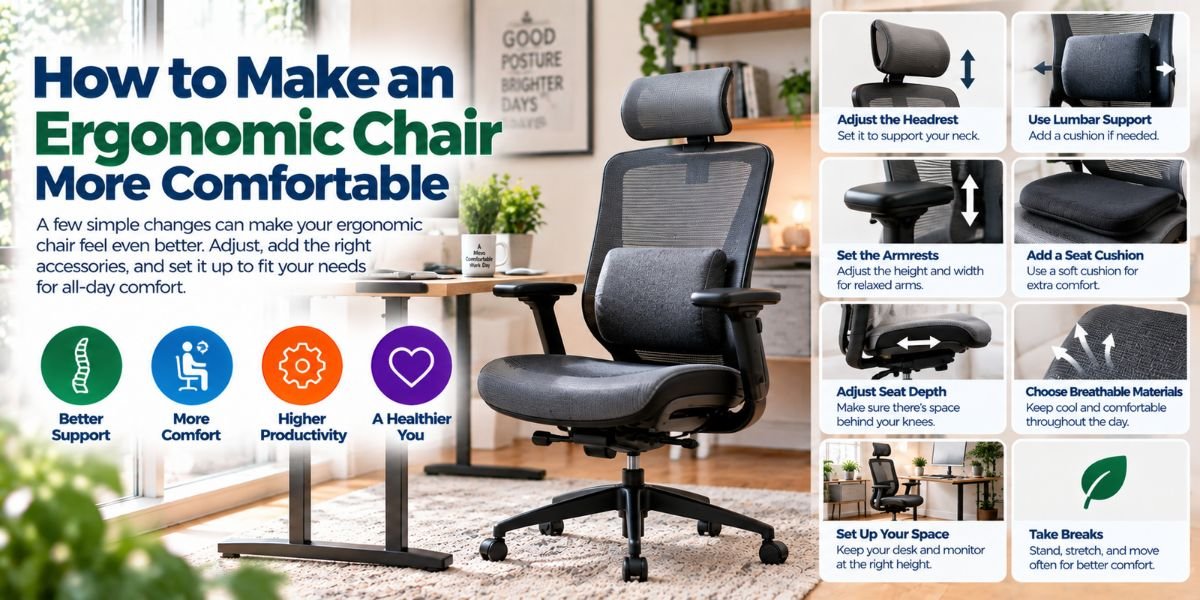
If your chair feels fine for 10 minutes but gets uncomfortable after an hour, it may not be set up well. The good news is that you often do not need a new chair.
You can make an ergonomic chair work much better by adjusting the seat, backrest, armrests, and head support. Small changes can make a big difference during long work days.
In this guide, I will show you how to make an ergonomic chair fit your body. I will also cover common mistakes, simple fixes, and the best setup for a desk.
How to Make an Ergonomic Chair
The best way to make an ergonomic chair is to adjust it to your body, desk, and daily work style. Start with the seat height, then set the seat depth, backrest, lumbar support, armrests, and headrest.
Your feet should rest flat on the floor. Your knees should stay near a right angle. Your back should feel supported without being pushed into an awkward position.
I like to adjust one part at a time. This makes it easier to notice what each change does.
Start With the Chair Height
Chair height is the first setting I would adjust.
Sit back in the chair and place both feet on the floor. Your knees should be close to a 90-degree angle. Your thighs should feel level or slope down slightly toward your knees.
Your desk also matters here. If you raise the chair but your desk stays too low, your arms may sit in a poor position.
A simple rule is this: adjust the chair so your feet are stable and your arms can reach the desk without lifting your shoulders.
If your feet cannot reach the floor after raising the chair, use a footrest. Do not let your legs hang for hours.
Set the Seat Depth
Seat depth is easy to ignore, but it can change how your legs and back feel.
Sit all the way back against the backrest. There should be a small gap between the front edge of the seat and the back of your knees.
A gap of about two to three fingers is a useful starting point.
If the seat is too deep, you may slide forward to avoid pressure behind your knees. That can reduce the support from the backrest.
If the seat is too short, your thighs may not get enough support.
Adjust the Backrest
The backrest should support your natural sitting position.
Sit back and let your spine rest against the chair. Do not force your back into a very straight or stiff position.
A good backrest should support you while still allowing some movement. You should be able to lean back when you want to relax.
If your chair has adjustable recline tension, set it so the chair can move without feeling loose or difficult to control.
I would avoid locking the backrest in one position for the whole day if the chair allows comfortable movement.
Position the Lumbar Support
Lumbar support should sit around the lower part of your back.
Move it up or down until it fills the natural curve in your lower back. If the support pushes too hard, reduce the pressure if your chair allows it.
Too much lumbar support can be just as annoying as too little. You should feel supported, not pushed forward.
If your chair has fixed lumbar support, adjust the backrest angle and seat position first. Sometimes a small change in your sitting position makes the fixed support feel better.
Adjust the Armrests
Your armrests should support your arms without lifting your shoulders.
Let your arms hang naturally. Then bend your elbows and bring your hands toward the keyboard or desk.
Set the armrests around the height of your elbows. Your shoulders should stay relaxed.
If the armrests are too high, your shoulders may stay raised. If they are too low, your arms may lose useful support.
There is no need to press your elbows hard into the armrests. Light support is usually enough.
Keep Your Keyboard and Mouse Close
A good chair cannot fix a poor desk setup.
Keep your keyboard and mouse close enough that you do not need to reach forward. Your elbows should stay near your body.
Your wrists should stay in a relaxed position. Try not to bend them sharply upward while typing.
I also keep the items I use most within easy reach. This reduces the need to lean forward again and again.
Set Your Monitor at a Good Height
Your monitor should not force you to look down all day.
Place the screen in front of you. The top of the screen can be around eye level, depending on your posture and screen size.
Your eyes should naturally look slightly downward toward the middle of the display.
Keep the monitor far enough away that you can read text without leaning toward it.
If you use two monitors, position the main screen directly in front of you. Put the second screen beside it if you use it often.
Use the Headrest Correctly
A headrest is not always needed for desk work.
If your chair has one, adjust it so it supports your head and neck when you lean back. It should not push your head forward while you work.
For many people, the headrest is most useful during relaxed sitting or reclining. It does not need to press against your head all the time.
If the headrest feels uncomfortable, lower it or move it away if the chair allows that.
Check Your Sitting Position
Once the chair is adjusted, check your whole body.
Your feet should feel stable. Your knees should have room. Your back should touch the backrest. Your shoulders should feel relaxed.
Your elbows should stay close to your body while you work. Your screen should be easy to see without leaning forward.
This whole setup matters more than any single adjustment.
A Simple Ergonomic Chair Setup
| Chair Part | Good Starting Point | What to Check |
|---|---|---|
| Seat height | Feet flat on floor | Knees near 90 degrees |
| Seat depth | Small gap behind knees | No pressure on knees |
| Backrest | Supports natural posture | Back feels supported |
| Lumbar support | Fits lower-back curve | No hard pressure |
| Armrests | Near elbow height | Shoulders stay relaxed |
| Headrest | Supports head when needed | Does not push head forward |
| Recline | Comfortable backward movement | Easy to change position |
These are starting points, not strict rules. Every body is different. Your comfort should guide the final adjustment.
How to Make an Ergonomic Chair More Comfortable
If your chair still feels uncomfortable, change only one setting at a time.
First, check the seat height. Then check the seat depth. After that, work on lumbar support and armrest height.
Give each change some time before making another adjustment. A position that feels strange for the first few minutes may feel better after you settle into it.
Also check your desk. A chair can be adjusted perfectly and still feel wrong if the keyboard, mouse, or monitor is too high or too far away.
Common Ergonomic Chair Mistakes
One common mistake is sitting too low.
When the chair is too low, your knees may rise and your desk may feel too high. This can make your arms sit in a poor position.
Another mistake is sitting too far forward. This often happens when the seat feels too deep. Moving forward may feel better for your knees, but it can leave your lower back without proper support.
I also see people set their armrests too high. Raised shoulders can make a long work session feel tiring.
Finally, do not assume that one perfect position exists. Staying still for many hours is not the goal. Changing position can be useful too.
Should an Ergonomic Chair Feel Firm?
It can.
An ergonomic chair does not need to feel like a soft sofa. A firm seat can provide steady support and make it easier to keep a stable position.
However, the seat should not create painful pressure points. If you feel strong pressure under your thighs or around your hips, check the seat height, depth, and angle.
Comfort is not only about softness. Support, fit, movement, and pressure all matter.
How Often Should You Adjust Your Chair?
You should adjust your chair whenever your work setup changes.
For example, a new desk, monitor, keyboard, or footrest can change the best chair position.
Your preferred position may also change during the day. You may want a more upright posture while typing and a more relaxed position while reading.
The goal is not to find one position and never move again. The goal is to create a setup that makes natural movement easy.
When a Chair Adjustment Is Not Enough
Sometimes the chair itself is the problem.
If the seat is too short, too deep, or too narrow for you, adjustment may not solve everything. The same is true if the lumbar support cannot reach your lower back.
A chair with limited adjustment options can also be hard to fit to different body sizes.
In that case, a different chair may make more sense than adding lots of cushions and accessories.
Before buying anything, I would check which parts of your current chair are causing the problem. That helps you know what features you actually need.
My Practical Tips for a Better Chair Setup
I would keep the process simple.
Start with your feet. Then move upward through your body. Set the seat first, followed by the backrest, lumbar support, armrests, and headrest.
Next, check the desk and monitor. Make sure your hands can reach the keyboard and mouse without a long forward reach.
Finally, move around. Lean back. Sit upright. Change your position. Your setup should support normal movement instead of making you feel locked in place.
FAQs
How do I make an ergonomic chair comfortable?
Start with the seat height and depth. Then adjust the backrest, lumbar support, and armrests so your body feels supported without extra pressure.
What is the best height for an ergonomic chair?
Set the chair so your feet rest flat on the floor and your knees are close to a right angle. Your desk should also allow your elbows to stay relaxed.
Where should lumbar support sit?
Lumbar support should fit the natural curve of your lower back. Adjust its height and pressure so it supports you without pushing too hard.
Should my arms rest on the chair or desk?
Either can work. The key is to keep your shoulders relaxed and your elbows near your body while you work.
Can an ergonomic chair fix bad posture?
A chair can support a better sitting setup, but it cannot fix every posture problem by itself. Your desk, monitor, keyboard, movement, and sitting habits also matter.
Conclusion
Learning how to make an ergonomic chair is mostly about getting the small settings right.
Set the seat for your legs. Support your lower back. Keep your shoulders relaxed. Place your screen and keyboard where you can use them without leaning forward.
Most of all, do not treat your chair like a fixed object. Adjust it as your body and work setup change.
A well-set chair should make work feel easier, not force you to think about your posture every minute.