
Introduction
So, what is the most ergonomic chair?
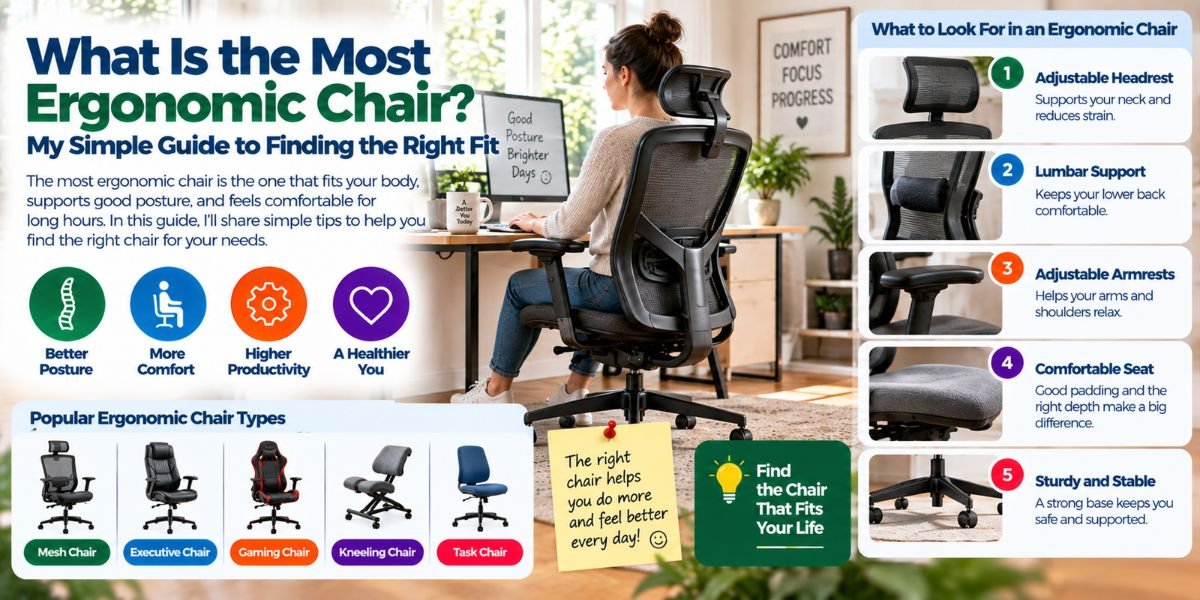
The short answer is simple: it is not always the chair with the most features or the highest price. The most ergonomic chair is the one that fits your body, supports your lower back, and lets you adjust the seat, backrest, and armrests to your needs.
That matters because everyone has a different body shape. A chair that feels great for one person may feel too deep, too high, or poorly supported for another.
When I look at ergonomic chair design, I pay close attention to adjustability first. A good chair should help you sit in a relaxed position without forcing your body into one fixed pose.
It should also let you change position during the day. Even a very good chair is not a reason to sit still for hours.
What Is the Most Ergonomic Chair?
The most ergonomic chair is a chair that can be adjusted to fit your body and work setup.
It should support your lower back, keep your feet supported, give your thighs enough room, and let your arms rest without lifting your shoulders.
There is no single chair that is perfect for every person. Your height, leg length, body size, desk height, and daily work all affect which chair will feel best.
That is why I would choose a well-adjustable chair over one that simply looks ergonomic.
The goal is not to find a chair with the longest feature list. The goal is to find one that you can set up correctly.
Why Adjustability Matters So Much
A fixed chair gives you fewer ways to match it to your body.
An adjustable chair gives you more control. You can raise or lower the seat. You can change the seat depth. You can adjust the back support. You can move the armrests.
This makes a big difference when you spend many hours at a desk.
For example, a tall person may need more seat depth to support the thighs. A shorter person may need a shorter seat so the front edge does not press behind the knees.
This is one reason I would not judge an ergonomic chair by appearance alone.
The Most Important Features of an Ergonomic Chair
Adjustable Seat Height
Seat height is one of the first things I would adjust.
Your feet should be supported by the floor or a footrest. Your knees should not feel forced into an awkward position.
If the chair is too high, your feet may hang or lose stable support. If it is too low, your legs and desk position may not feel right.
A good height adjustment lets you find a comfortable middle point.
Adjustable Seat Depth
Seat depth is easy to overlook.
The seat should support much of your thighs without pressing into the back of your knees. It should also let you sit back against the backrest.
This is especially important for people with shorter or longer legs.
A sliding seat pan can be very useful because it lets you change the distance between your body and the backrest.
Good Lumbar Support
Lower-back support is a major part of an ergonomic chair.
The backrest should support the natural curve of your lower back. Better chairs often let you move or adjust the lumbar support.
I would not assume that a large lumbar cushion is automatically better. Too much pressure can feel just as uncomfortable as too little.
The support should fit your back and feel useful without forcing you forward.
A Supportive Backrest
The backrest should support your back while still allowing you to move.
A useful backrest can often recline or change angle. This gives you more than one comfortable working position.
A chair that locks you into one rigid posture may not be as useful for long work sessions.
I prefer the idea of supported movement rather than trying to hold one perfect posture all day.
Adjustable Armrests
Armrests can help take some load off your shoulders and arms.
But they need to fit your body.
If they are too high, your shoulders may stay raised. If they are too low, they may provide little useful support.
Adjustable armrests are helpful because you can move them into a position where your forearms are supported while your shoulders stay relaxed.
They also should not stop you from moving the chair close enough to your desk.
A Comfortable Seat
The seat should feel supportive without creating pressure points.
A rounded front edge can help reduce pressure behind the legs. The seat should also be wide enough for your body.
Too much softness is not always better. A seat that feels very soft at first may not provide the support you want during a long work session.
I would focus more on fit and pressure than on how plush the chair feels for the first few minutes.
A Stable Base
A good ergonomic chair should also feel stable.
A five-leg base with smooth-rolling casters is a common design for office chairs. The chair should move easily without feeling unstable.
This may seem like a small detail, but it matters when you move around your desk often.
Is a Headrest Necessary?
Not always.
A headrest can feel nice when you recline or take a break. It can also be useful for people who spend time in a more relaxed position.
But I would not make a headrest a top buying requirement for everyone.
If most of your day involves typing and working at a desk, lumbar support, seat fit, and armrest adjustment usually deserve more attention.
A headrest should be a useful extra, not the main reason you choose a chair.
Mesh vs. Cushion: Which Is More Ergonomic?
Both can work well.
Mesh can feel cooler because air can move through the backrest. This can be useful if your office gets warm.
A padded backrest can provide a different feel and may suit people who prefer a softer surface.
The material alone does not make a chair ergonomic.
A poorly fitted mesh chair is still a poor ergonomic choice. The same is true for a soft padded chair.
I would choose based on support, fit, adjustability, and comfort rather than material alone.
How Should an Ergonomic Chair Fit Your Body?
Start with the seat height.
Place your feet firmly on the floor or a footrest. Your knees should be in a comfortable position.
Next, adjust the seat depth. You should be able to sit back against the backrest without the front edge pushing into the back of your knees.
Then adjust the lumbar support so it meets your lower back.
After that, set the armrests. Your shoulders should feel relaxed, not lifted.
Finally, adjust the backrest angle and chair tilt to find a comfortable working position.
The important thing is to make small changes. You do not need to find the perfect setting in one move.Read moreStepRite Kitchen Mats Review: My Honest Take
What Is the Best Chair for Sitting All Day?
There is no single answer for everyone.
For long desk sessions, I would look for a chair with strong adjustability, good lumbar support, adjustable seat depth, useful armrests, and a backrest that allows movement.
A breathable back can also be helpful if you tend to get warm.
But the chair is only one part of the setup.
Your monitor height, keyboard position, desk height, and work habits also affect how comfortable you feel.
Even a very expensive ergonomic chair cannot fix a poorly arranged workstation by itself.
What Makes a Chair Ergonomic for Short People?
Shorter users often need to pay close attention to seat depth and seat height.
A seat that is too deep can prevent you from sitting properly against the backrest. It may also press behind your knees.
A chair with a sliding seat pan can make this easier to manage.
Adjustable armrests are also useful. Fixed armrests may sit too high or too far away for some smaller users.
The best choice is usually a chair with enough adjustment range to fit your body rather than a chair marketed simply as “ergonomic.”
What Makes a Chair Ergonomic for Tall People?
Tall users often need more seat depth and enough backrest support.
A short seat may leave too much of the thighs unsupported. A low backrest may also fail to provide comfortable support.
Look for a chair with a generous adjustment range.
Seat depth is especially important. A chair that allows the seat to move forward and backward can make it much easier to find a comfortable position.
Common Ergonomic Chair Mistakes
Choosing Based Only on Price
A high price does not automatically mean better ergonomics.
Some expensive chairs have excellent adjustment options. Others may have features you never use.
Think about fit first.
Buying Without Checking Seat Depth
This is one of the easiest mistakes to make.
People often check seat width and height but forget depth.
A chair can look large and comfortable but still feel wrong if the seat is too deep for your legs.
Setting the Armrests Too High
High armrests can make your shoulders stay raised.
That can quickly become uncomfortable.
Adjust them so your arms can rest while your shoulders remain relaxed.
Staying in One Position for Hours
This is another important point.
A good ergonomic setup should make movement easier, not stop you from moving.
Change your sitting position. Stand up when you can. Walk around for short periods. Take brief breaks from the screen.
Your body was not designed to stay completely still all day.
How Much Should You Spend on an Ergonomic Chair?
You do not need to start with the most expensive chair.
I would set a budget based on how often you use the chair.
If you work at a desk for only a short time each day, basic adjustability may be enough.
If you work from home for many hours, stronger adjustment options may be worth paying for.
Before spending more, check what you are actually getting.
I would rather have a chair with useful seat-depth, lumbar, height, and armrest adjustments than a chair that costs more because of cosmetic features.
A Simple Ergonomic Chair Checklist
Before buying, I would check these points:
| Feature | What to look for |
|---|---|
| Seat height | Easy adjustment for your feet and desk |
| Seat depth | Enough thigh support without knee pressure |
| Lumbar support | Support that fits your lower back |
| Backrest | Supportive and able to recline |
| Armrests | Adjustable and comfortable |
| Seat | Wide enough with a comfortable front edge |
| Base | Stable five-leg design |
| Casters | Smooth movement on your floor |
| Tilt | Useful range for changing positions |
| Fit | Suitable for your height and body size |
So, What Is the Most Ergonomic Chair for You?
The most ergonomic chair for you is the one that fits your body and lets you adjust it properly.
I would put fit ahead of looks.
I would put useful adjustment ahead of a long feature list.
And I would put proper support ahead of brand name.
The right chair should make it easier to keep your feet supported, your lower back comfortable, your shoulders relaxed, and your body free to change position.
That is what ergonomic design should really do.
FAQs
What is the most ergonomic chair?
The most ergonomic chair is one that fits your body and offers useful adjustments. Seat height, seat depth, lumbar support, backrest movement, and armrest adjustment are key features.
Is an expensive chair always more ergonomic?
No. Price does not guarantee a better fit. A less expensive chair with the right adjustments may work better for your body than a costly chair that does not fit you.
What is the most important part of an ergonomic chair?
For many users, adjustable seat height and good lower-back support are among the most important features. Seat depth and armrest adjustment also matter for proper fit.
Is a headrest important for an ergonomic chair?
Not for everyone. A headrest can be useful when reclining, but it is usually less important than proper seat fit, lumbar support, and useful adjustment options.
Should an ergonomic chair have a footrest?
A footrest can help when your chair must be high enough for your desk but your feet cannot comfortably reach the floor. The goal is stable support for your feet.
Conclusion
So, what is the most ergonomic chair?
It is not simply the chair with the most features or the biggest price tag. It is the chair that fits your body, supports your back, and gives you enough control to create a comfortable working position.
When choosing one, start with the basics: seat height, seat depth, lumbar support, backrest adjustment, and armrests.
Then think about your own body and daily work.
The best ergonomic chair is the one you can adjust to you, not the one that expects you to adjust to it.