
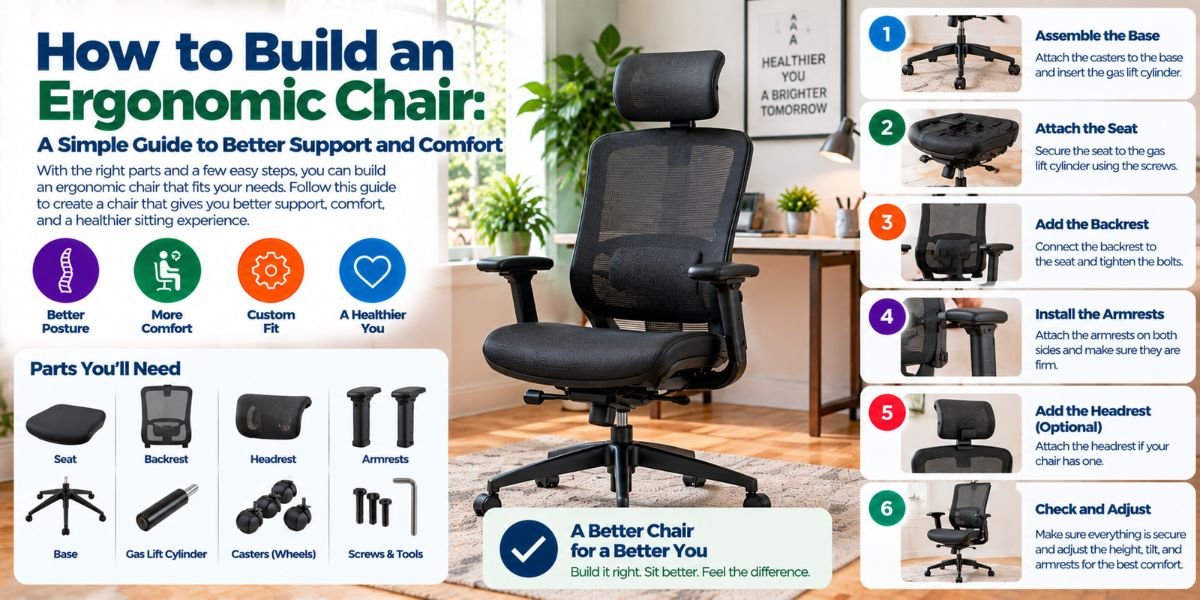
Sitting for hours can make even a good chair feel bad. The problem is often not the chair alone. It may be the seat height, seat depth, back support, or armrest position.
So, how do you build an ergonomic chair? Start with the parts that support your body. You need a seat that fits your legs, a backrest that supports your lower back, and adjustments that let you change the chair to fit you.
I find the best approach is simple: build the chair around the person, not the other way around. A chair can have many features, but they only help when they fit your body and your desk.
What Makes a Chair Ergonomic?
An ergonomic chair is not just a chair with a thick cushion and a tall back. It should help you sit in a balanced position while letting you change your posture.
The main parts are the seat, backrest, lumbar support, armrests, base, and adjustment controls. Each part has a different job.
A good chair should let your feet rest firmly on the floor or a footrest. Your back should have support, especially around the lower back. Your shoulders should stay relaxed, and your arms should not need to reach up or out.
The chair should also work with your desk. A well-built chair can still feel wrong if the desk is too high or too low.
Start With the Seat
The seat is the part that carries most of your body weight. It needs to be wide enough for you and deep enough to support your thighs without pressing behind your knees.
A seat that is too short may not support enough of your thighs. A seat that is too deep can make it hard to sit against the backrest.
For most people, an adjustable seat depth is a useful feature. It lets you move the seat or backrest to create a better fit.
The front edge should also be rounded rather than sharp. A waterfall-style edge can reduce pressure at the back of the legs.
Set the Seat Height
Seat height is one of the first things I would adjust.
Sit back in the chair and place both feet on the floor. Your feet should feel stable. Your knees should not be forced far upward or downward.
If the chair is too high, your feet may hang or you may slide forward. That can reduce back support. If the chair is too low, your legs may feel cramped under the desk.
If you cannot keep your feet flat because the desk needs the chair to be higher, a footrest can help.
Build a Supportive Backrest
The backrest should follow the general shape of your back. It should support both the upper and lower back without forcing you into one stiff position.
The lower back needs special attention. A lumbar support should fit into the natural inward curve of your lower back.
Adjustable lumbar support is useful because people have different body shapes. A fixed support may feel great for one person and uncomfortable for another.
The backrest should also allow some recline. Sitting slightly back can give you another comfortable working position.
I would avoid a backrest that only moves forward and backward without giving useful support. The goal is not just movement. The goal is controlled support.
Add Adjustable Lumbar Support
Lumbar support is one of the most important parts of an ergonomic chair.
Place the support where it fills the natural hollow in your lower back. It should support you without pushing your back too far forward.
If the lumbar support is too high, it may press into the wrong part of your back. If it is too low, it may not support the lower back well.
This is why height adjustment can be more useful than simply making the lumbar pad larger.
You do not need a huge cushion. You need support in the right place.
Choose the Right Seat Depth
Seat depth is easy to overlook.
Sit with your back against the backrest. There should be some space between the front edge of the seat and the back of your knees.
If the seat is too long, you may move forward to avoid pressure behind your knees. That can leave your lower back away from the lumbar support.
If the seat is too short, your thighs may not get enough support.
An adjustable seat pan solves much of this problem. It lets you change the distance between your back and the front edge of the seat.
Add Armrests Carefully
Armrests can help take some load off your shoulders and arms. But they are not useful when they force your body into a bad position.
Set the armrests so your shoulders can stay relaxed. Your elbows should remain close to your body while your forearms are supported.
Do not set the armrests so high that your shoulders stay raised. Do not set them so low that you have to lean sideways to use them.
Width matters too. Armrests that are too far apart may make you reach outward. Armrests that are too close can limit movement.
If the armrests prevent you from getting close enough to your desk, they may do more harm than good. In that case, adjustable or removable armrests can be a better choice.
Use a Stable Five-Leg Base
The base is easy to ignore because you do not feel it while sitting. But it affects stability and movement.
For a typical office chair, a five-leg base with suitable casters gives a stable platform. The wheels should also match the floor.
A chair that rolls well on carpet may behave differently on a hard floor. Think about where you will use the chair before choosing the casters.
A swivel base is also useful at a desk. It lets you turn toward nearby items without twisting your body as much.
Pick the Right Cushion and Cover
A soft seat may feel great for a few minutes. That does not mean it will stay comfortable during a long work session.
The seat should provide support without feeling hard or unstable. The material should also hold its shape instead of quickly becoming flat.
Breathable fabric can be useful if you sit for long periods. It may feel more comfortable than a surface that traps heat.
Do not judge a chair only by how soft it feels when you first sit down. Support and fit matter more than a very plush cushion.
Make the Chair Work With Your Desk
Even the best chair cannot fix a poor workstation by itself.
After adjusting the chair, check your desk. Your arms should be able to reach the keyboard and mouse without forcing your shoulders upward or making you lean far forward.
Your chair should also slide close enough to the desk. Large or poorly placed armrests can stop this from happening.
If your desk is fixed at a height that does not work with your chair, you may need to adjust the chair and use a footrest when needed.
The chair and desk should be treated as one setup.
How I Would Set Up an Ergonomic Chair
I would adjust the chair in this order:
- Set the seat height.
- Place both feet firmly on the floor or footrest.
- Adjust the seat depth.
- Set the backrest height and position.
- Place the lumbar support in the lower-back curve.
- Set the recline tension and backrest position.
- Adjust the armrests.
- Move the chair close to the desk.
- Check your keyboard and mouse position.
- Sit for a while and make small changes.
Small changes matter. You may not find the best position on the first try.
Common Mistakes When Building an Ergonomic Chair
One common mistake is making the chair too soft. A soft cushion may feel comfortable at first but may not give enough support.
Another mistake is choosing a fixed seat depth. A chair can look excellent but still be the wrong size for your legs.
Many people also set the armrests too high. Raised shoulders can create tension during computer work.
Another problem is relying on lumbar support while ignoring the rest of the chair. Good lumbar support cannot fix a seat that is too high or too deep.
Finally, do not stay in one position for hours just because the chair feels ergonomic. Changing position, standing, and walking for short periods are still important.Read moreHow to Build an Ergonomic Chair That Feels Right
Ergonomic Chair Features Worth Prioritizing
| Chair feature | Why it matters |
|---|---|
| Adjustable seat height | Helps place your feet and legs in a better position |
| Adjustable seat depth | Lets the seat fit different leg lengths |
| Lumbar support | Supports the natural curve of the lower back |
| Adjustable backrest | Allows better back support and posture changes |
| Recline function | Gives you another supported sitting position |
| Adjustable armrests | Helps keep shoulders and elbows relaxed |
| Rounded seat edge | Reduces pressure behind the legs |
| Five-leg base | Provides a stable chair platform |
| Suitable casters | Helps the chair move safely on your floor |
| Breathable material | Can improve comfort during long sitting |
How to Know If Your Chair Needs More Adjustment
Your body can give you useful clues.
If your feet do not reach the floor, check the seat height. If you keep sliding forward, check the seat depth and backrest.
If your shoulders feel raised, look at the armrests. If you cannot sit against the backrest without pressure behind your knees, the seat may be too deep.
If you keep leaning toward the desk, check the chair position and desk height. You should not need to fight the chair to reach your work area.
The goal is not to force your body into one perfect pose. The goal is to create a setup that supports comfortable movement.
What About a DIY Ergonomic Chair?
You can improve a basic chair without rebuilding the entire frame.
A removable lumbar cushion can add lower-back support. A separate footrest can help when the chair must be raised for the desk.
You can also replace poor casters or add a seat cushion if the original seat does not suit you.
But there is a limit to DIY changes. A cushion cannot fix a seat pan that is the wrong size. A lumbar pad cannot solve a backrest that is badly shaped.
If the basic chair does not fit your body, buying a chair with better adjustment may be the better long-term choice.
The Best Way to Build an Ergonomic Chair Setup
The best ergonomic chair is not always the chair with the most features. It is the chair that fits your body and works well with your desk.
Start with seat height and depth. Then adjust the backrest and lumbar support. Set the armrests only as high as needed to support your arms without raising your shoulders.
After that, look at the whole workstation. Your chair, desk, keyboard, mouse, and monitor should work together.
Most important, keep moving. A good chair supports your body, but it should not encourage you to sit still all day.
FAQs
How do you make a normal chair more ergonomic?
Start with seat height and back support. Add a lumbar cushion or footrest if needed. Make sure your desk and arm position also work with the chair.
What is the best seat height for an ergonomic chair?
Your feet should rest flat on the floor or a footrest. Your legs should feel supported without pressure behind the knees. Adjust the height to fit your body and desk.
Should an ergonomic chair have lumbar support?
Yes, lumbar support can help support the natural curve of your lower back. Adjustable support is useful because body shapes differ.
Are armrests necessary on an ergonomic chair?
No. Armrests can help, but only when they fit your body and workstation. Poorly placed armrests can interfere with movement and desk position.
Can I turn a regular chair into an ergonomic chair?
You can improve many regular chairs with a lumbar cushion, seat cushion, or footrest. However, these changes cannot fix every problem with seat size, height, or backrest design.
Conclusion
Learning how to build an ergonomic chair is mostly about getting the fit right. You need the right seat height, enough thigh support, useful lumbar support, and armrests that let your shoulders relax.
I would focus on adjustment before extra features. A simple chair that fits your body can work better than a feature-heavy chair that does not.
Build the chair around your body, match it to your desk, and change your position during the day. That is the simplest way to create a more comfortable ergonomic setup.